Introduction to Azure Application Gateway
Azure Application Gateway
Azure Application Gateway manages requests sent by client applications to web applications hosted on a pool of web servers. These web server pools can be Azure virtual machines, Azure Virtual Machine Scale Sets, Azure App Service, or even on-premises servers.
Application Gateway provides features such as HTTP traffic load balancing and a Web Application Firewall (WAF). The service also supports TLS/SSL encryption for traffic between users and the application gateway, as well as between the application gateway and application servers.
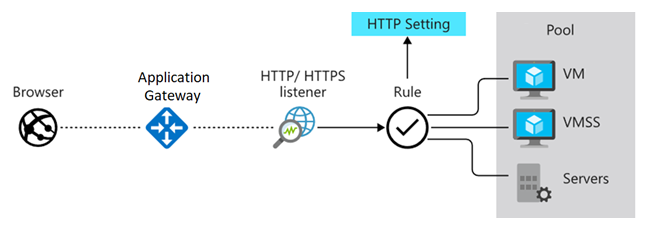
The Application Gateway uses a round-robin process to balance request load across servers in each backend pool. Session stickiness ensures that client requests within the same session are directed to the same backend server. Session stickiness is crucial for e-commerce applications where transactions must not be interrupted by the load balancer redirecting requests to different backend servers.
Azure Application Gateway includes the following features:
- Support for HTTP, HTTPS, HTTP/2, and WebSocket protocols.
- Web Application Firewall to protect against web application vulnerabilities.
- End-to-end request encryption.
- Autoscaling to dynamically adjust capacity as web traffic changes.
- Connection draining to gracefully remove backend pool members during scheduled maintenance.
How Azure Application Gateway Works
Azure Application Gateway consists of components that work together to securely route and balance request load to a pool of web servers. The components include:
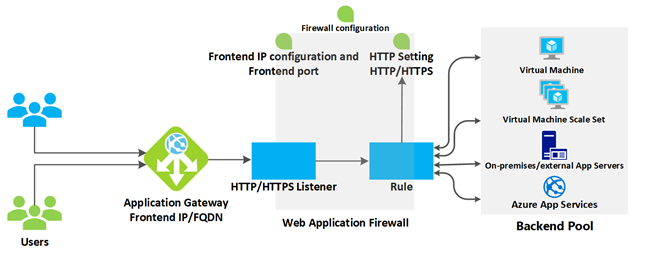
1. Front-end IP Address
Client requests are received via the front-end IP address. Users can configure the Application Gateway to have a public IP address, a private IP address, or both. The Application Gateway cannot have more than one public IP address and one private IP address.
2. Listener
The Application Gateway uses one or more listeners to receive incoming requests. Listeners accept traffic based on a combination of protocol, port, host, and IP address settings. Each listener routes requests to backend pools according to defined routing rules.
- A Basic Listener routes based only on the path in the URL.
- A Multi-site Listener can also route based on the hostname element of the URL.
Listeners also handle TLS/SSL certificates to secure communication between users and the Application Gateway.
3. Routing Rules
Routing rules link listeners to backend pools. The rules determine how hostnames and URL paths are interpreted and routed to the appropriate backend pools. Rules also include related HTTP settings such as:
- Protocol
- Session stickiness
- Connection draining
- Request timeout
- Health probes
- Traffic encryption settings between the Application Gateway and backend servers
Load Balancing
The Application Gateway uses a round-robin mechanism to balance requests to servers in the backend pool. This load balancing works at OSI Layer 7, meaning the gateway considers parameters like hostname and path.
In comparison, Azure Load Balancer works at OSI Layer 4, which only considers the destination IP address.
If needed, users can enable session stickiness to ensure all requests in the same session are directed to the same server.
Web Application Firewall (WAF)
The WAF is an optional component that processes requests before they reach the listener. It inspects requests for common threats based on OWASP standards, such as:
- SQL Injection
- Cross-site scripting (XSS)
- Command injection
- HTTP request smuggling
- Remote file inclusion
- Bots, crawlers, and scanners
- HTTP protocol violations and anomalies
WAF supports four rule sets (CRS): 3.2, 3.1 (default), 3.0, and 2.2.9. Users can select specific rules and customize the firewall to inspect certain request elements and limit message sizes.
Backend Pool
A backend pool is a collection of web servers that can consist of:
- Static VMs
- Virtual Machine Scale Sets
- Applications on Azure App Service
- On-premises servers
Each backend pool has its own load balancer. If using TLS/SSL, users can include certificates for re-encrypting traffic. For Azure App Service, certificates do not need to be installed manually — all communication is already encrypted and trusted by the Application Gateway.
Application Gateway Routing
Client request routing to backend pool web servers is based on two main methods:
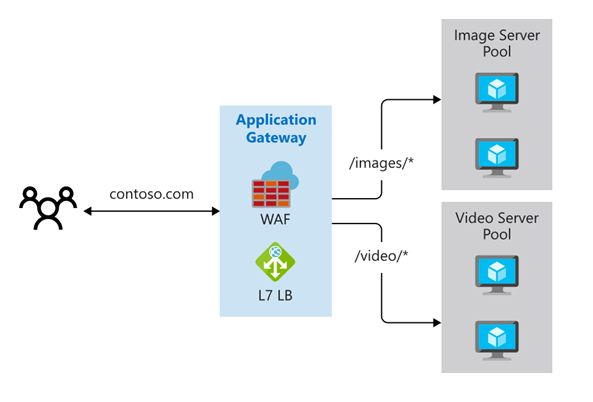
Path-Based Routing
Requests with specific URL paths are routed to different server pools. Examples:
/video/*→ dedicated video servers/images/*→ dedicated image servers
Multiple-Site Routing
Runs multiple web applications on a single Application Gateway instance. This configuration uses multiple domain names (CNAMEs), listeners, and different rules. Examples:
http://contoso.com→ one backend poolhttp://fabrikam.com→ another pool
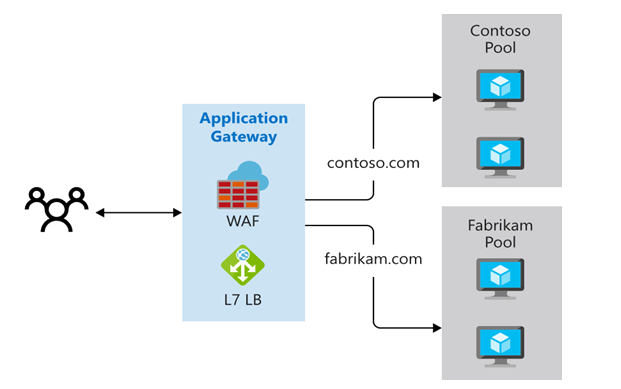
Multi-site routing is useful for multitenant applications where each tenant has its own VM or resources.
Other routing features:
- Redirection: Redirect to another site, or HTTP to HTTPS.
- Rewrite HTTP headers: Modify request and response headers.
- Custom error pages: Display branded custom error pages.
TLS/SSL Termination
TLS/SSL termination is handled by the Application Gateway to reduce server CPU load. There is no need to configure TLS/SSL on backend servers.
For end-to-end encryption, the Application Gateway can:
- Decrypt traffic using its private key.
- Re-encrypt using the backend server's public key.
Requests come in on the front-end port and are processed by the listener based on host, port, and IP. The listener then applies routing rules to direct traffic to the backend pool.
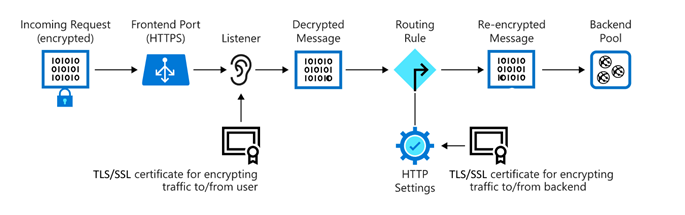
Accessing a website through the Application Gateway also reduces the attack surface because only ports 80 or 443 are open to the internet, not directly to the servers.
Health Probes
Health probes determine which servers are healthy and can receive traffic. If not configured, a default probe waits 30 seconds to decide if a server has failed.
Servers are considered healthy if they respond with an HTTP status between 200–399.
Autoscaling
Application Gateway supports autoscaling, allowing capacity to automatically increase or decrease based on traffic load. Users no longer need to select instance sizes or counts at provisioning.
WebSocket and HTTP/2 Support
Application Gateway natively supports WebSocket and HTTP/2 protocols, enabling full-duplex communication between servers and clients over long-lived TCP connections.
Benefits:
- More interactive and efficient
- No polling required as with HTTP
- Works over standard ports 80 and 443
When to Use Azure Application Gateway
Azure Application Gateway meets organizational needs for these reasons:
-
Routing: Routes traffic from Azure endpoints to backend pools consisting of servers running in on-premises datacenters.
The health probe feature ensures traffic is not routed to unavailable servers. -
TLS Termination: Offloads CPU usage on backend servers by handling encryption/decryption.
-
Web Application Firewall (WAF): Allows blocking of traffic containing cross-site scripting (XSS) and SQL injection attacks before reaching backend servers.
-
Supports session affinity, important because some web applications store user session states locally on each backend server.
Azure Application Gateway is not suitable if you have a web application that does not require load balancing. For example, if you have a low-traffic web application and your existing infrastructure can handle the load, there is no need to implement backend pools or use Application Gateway.
Azure also provides other load balancing solutions such as Azure Front Door, Azure Traffic Manager, and Azure Load Balancer.
Here are their differences:
Azure Front Door
Azure Front Door is an application delivery network offering global load balancing and site acceleration for web applications.
Features include:
- Layer 7 load balancing
- TLS/SSL termination
- Path-based routing
- Fast failover
- Web Application Firewall
- Caching to improve performance and availability
Use Front Door for scenarios like load balancing web applications deployed across multiple Azure regions.
Azure Traffic Manager
Azure Traffic Manager is a DNS-based load balancer that allows you to optimally distribute traffic to services across different Azure regions, while maintaining high availability and responsiveness.
Because it is DNS-based, Traffic Manager only works at the domain level, so failover is not as fast as Front Door due to common issues like DNS caching and TTL that do not apply to Front Door.
Azure Load Balancer
Azure Load Balancer is a high-performance, low-latency Layer 4 load balancing service for all UDP and TCP protocols.
Key features:
- Can handle millions of requests per second
- Zone-redundant for high availability
- Supports inbound and outbound traffic balancing
- Works within a single region (not global)