Network Security Group Configuration
Implementing Network Security Groups
- You can restrict network traffic to resources in a virtual network using Network Security Groups (NSGs).
- You can assign NSGs to subnets or network interfaces (NICs) and define security rules within the group to control network traffic.
What You Need to Know About Network Security Groups
Let’s review the characteristics of a Network Security Group:
- An NSG contains a list of security rules that allow or deny inbound and outbound network traffic.
- NSGs can be associated with subnets or network interfaces (NICs).
- A single NSG can be associated with multiple entities.
- You can create NSGs and define rules through the Azure Portal.
- The Overview page for a virtual machine provides information on associated NSGs, including:
- Assigned subnet
- Assigned NIC
- Defined security rules
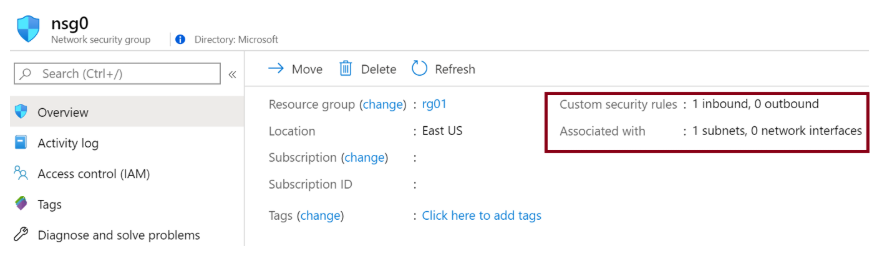
NSG and Subnets
- You can assign an NSG to a subnet and create a protected subnet (also known as a Demilitarized Zone or DMZ).
- A DMZ acts as a buffer between resources in your virtual network and the internet.
- Use NSGs to restrict traffic flow to all machines within that subnet.
- Each subnet can only have one NSG associated at a time.
NSG and Network Interface (NIC)
- You can also assign an NSG to a network interface card (NIC).
- NSG rules control all traffic through that NIC.
- Each NIC in a subnet can have zero or one NSG associated with it.
Explaining Network Security Group Rules
Security rules in a Network Security Group (NSG) allow you to filter network traffic. You can define rules to control inbound and outbound traffic to virtual network subnets and network interfaces (NICs).
Security Rule Characteristics
Let’s examine key aspects of NSG security rules:
- Azure automatically creates several default security rules in each NSG for both inbound and outbound traffic. Examples include:
DenyAllInboundAllowInternetOutbound
- Default rules are created every time a new NSG is created.
- You can add custom security rules by specifying your own conditions.
Here are common settings and values for security rules:
| Setting | Values |
|---|---|
| Source | Any, IP Addresses, My IP, Service Tag, Application Security Group |
| Source port ranges | Define ports to allow or deny traffic |
| Destination | Any, IP Addresses, Service Tag, Application Security Group |
| Protocol | TCP, UDP, ICMP, or Any |
| Action | Allow or Deny |
| Priority | Unique value from 100 to 4096 |
- Each security rule has a Priority.
- Rules are processed in priority order — lower numbers have higher precedence.
- You cannot delete default rules, but you can override them with higher-priority rules.
Inbound Traffic Rules
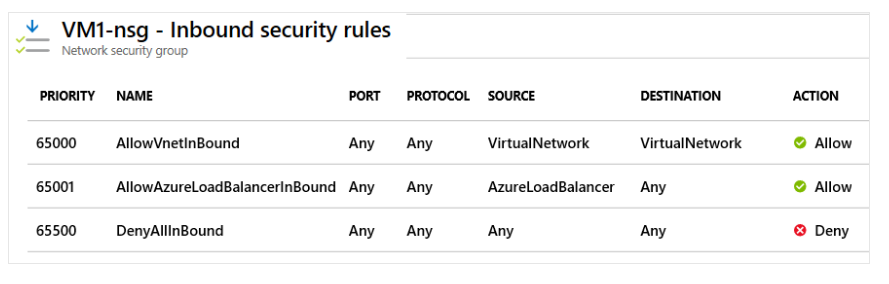
Azure defines three default inbound rules for each NSG:
- These rules deny all inbound traffic, except:
- Traffic from the virtual network
- Traffic from an Azure Load Balancer
Outbound Traffic Rules
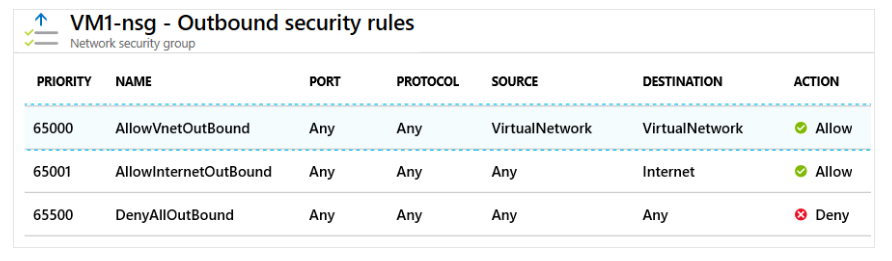
Azure also defines three default outbound rules:
- These only allow outbound traffic to:
- The Internet
- The same virtual network
Effective Rules of Network Security Groups
Each NSG and its security rules are evaluated independently. Azure processes the conditions in each rule for every virtual machine configuration.
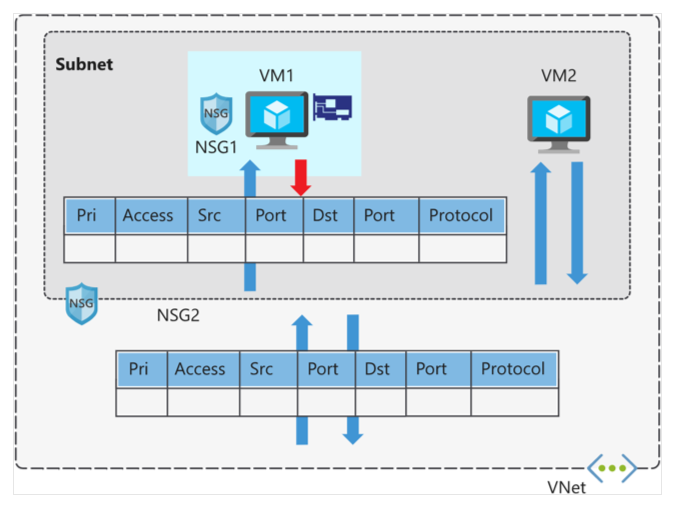
- For inbound traffic, Azure first processes the NSG associated with the subnet, then the NSG associated with the NIC.
- For outbound traffic, the process is reversed: Azure first evaluates the NIC, then the subnet.
- In both directions, Azure also evaluates rules affecting intra-subnet traffic — that is, traffic between VMs in the same subnet.
How Azure applies these rules determines how effective your security posture will be.
NSG Evaluation
If you apply NSGs to both subnets and NICs, each NSG is evaluated independently. Inbound and outbound rules are processed by priority order.
Considerations for Effective Rule Creation
Consider Allowing All Traffic
- If you place a VM in a subnet or use a NIC without associating an NSG, Azure will allow all traffic by default.
- If you do not need strict traffic control, you do not need to associate an NSG.
Importance of Allow Rules
- When creating NSGs, you must define allow rules for both the subnet and NIC.
- If only one level (e.g., subnet) has allow rules, traffic may still be denied at the NIC level.
Consider Intra-Subnet Traffic
- NSGs applied to a subnet also affect communication between VMs within the same subnet.
- You can deny intra-subnet traffic by creating rules that deny all inbound and outbound traffic.
- This can prevent lateral movement between compromised VMs.
Consider Rule Priorities
- Rules are processed in priority order — lower numbers are processed first.
- Use spacing like 100, 200, 300 to allow room for future rules without renumbering existing ones.
Viewing Effective Security Rules
If you have multiple NSGs and are unsure which rules apply, use the Effective security rules link in the Azure Portal.
This helps verify active rules for:
- Virtual machines
- Subnets
- Network interfaces (NICs)
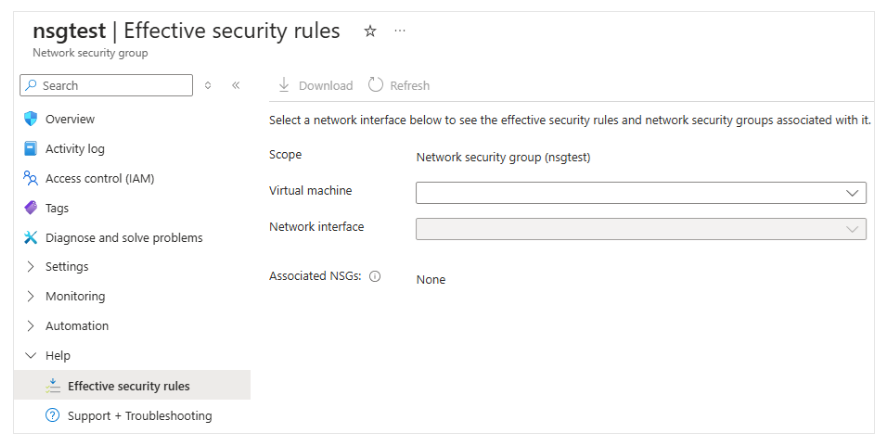
Azure Network Watcher provides a consolidated view of all network infrastructure rules.
Creating Network Security Group Rules
It's easy to add security rules to control inbound and outbound traffic through the Azure portal. You can configure NSG rule settings in your virtual network and choose from communication services like HTTPS, RDP, FTP, and DNS.
What to Know When Configuring Security Rules
Below are properties you must configure when creating a rule. Consider what services your network requires.
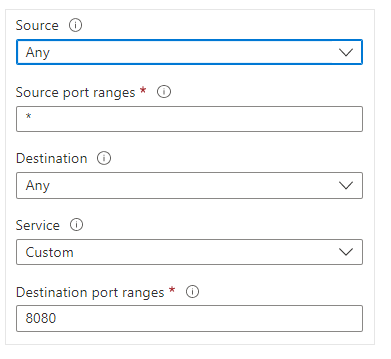
Source
Controls inbound traffic by specifying the source IP address range to allow or deny. Sources can be:
- Any resource
- IP address range
- Application Security Group
- Default Tag
Destination
Controls outbound traffic by specifying the destination IP address range to allow or deny. Destinations can also be:
- Any resource
- IP address range
- Application Security Group
- Default Tag
Service
Specifies the protocol and destination port range. You can choose predefined services like:
- RDP
- SSH
- HTTPS
Or set custom port ranges as needed.

Priority
Determines rule order. All rules in an NSG — at both subnet and NIC levels — are processed based on priority.
- Lower values mean higher priority.
- No two rules can have the same priority.

Enhance your learning with the Secure and isolate access to Azure resources using NSGs and service endpoints module.
It includes an interactive sandbox for hands-on practice.
Implementing Application Security Groups
You can implement Application Security Groups (ASGs) in an Azure virtual network to logically group VMs by workload. You then define NSG rules based on these ASGs.
What to Know About ASG Usage
ASGs work like NSGs but provide an application-focused approach to network security. Group VMs into ASGs and use those groups as source or destination in NSG rules.
Let’s explore ASGs using an online store scenario. In this case, we’ll control traffic to VMs grouped by ASG.
Scenario Requirements
This scenario includes two tiers: web server and application server.
- The web server handles internet traffic via HTTP and HTTPS.
- The application server processes SQL requests from the web server.
Solution
To implement this, do the following:
- Create an ASG for each tier.
- Assign each VM’s NIC to the appropriate ASG.
- Create an NSG and define rules.
Rule 1:
- Priority:
100 - Allow internet access to web servers on HTTP (80) and HTTPS (443).
- This is the highest priority rule (lowest number).
- It's critical for customer access to the store.
Rule 2:
- Priority:
110 - Allow traffic from web servers to app servers via port 1433 (SQL over HTTPS).
Rule 3:
- Priority:
120 - Deny all other access to app servers on port 1433.
The combination of Rule 2 and Rule 3 ensures only web servers can access the database, protecting it from external threats.
Considerations for Using ASGs
No Need to Manage Individual IPs
- With ASGs, you don’t need to create rules for each individual IP.
- This simplifies management, especially with many VMs.
Not Tied to Subnets
- You don’t need to place servers in specific subnets.
- Instead, group by application or function.
Simpler Rules
- Rules automatically apply to all VMs in the ASG.
- No need for individual VM rules.
Supports Workload Organization
- ASG-based configurations are easier to understand and manage
since they're organized by application use.
Use with Service Tags
- Service Tags represent Azure services and simplify rule definitions.
- Combine Service Tags with ASGs for effective policy application.