Virtual Network Configuration
Virtual Network Planning
One of the key benefits of adopting cloud solutions like Azure is that it enables IT departments to transition server resources to the cloud. Moving resources to the cloud can save costs and simplify administrative operations.
Relocating resources eliminates the need to maintain expensive data centers with uninterruptible power supplies, generators, multiple backup systems, or clustered database servers.
What to Know About Azure Virtual Networks
You can use Azure Virtual Network to create a virtual representation of your network in the cloud. Here are some characteristics of virtual networks in Azure:
- Azure Virtual Network is a logical isolation of Azure cloud resources.
- You can use virtual networks to provide and manage virtual private networks (VPNs) in Azure.
- Each virtual network has its own Classless Inter-Domain Routing (CIDR) block and can be connected to other virtual networks and on-premises networks.
- You can connect a virtual network to on-premises infrastructure to create hybrid or cross-site solutions, as long as the CIDR blocks of connected networks do not overlap.
- You control DNS server settings for the virtual network and can segment the virtual network into subnets.
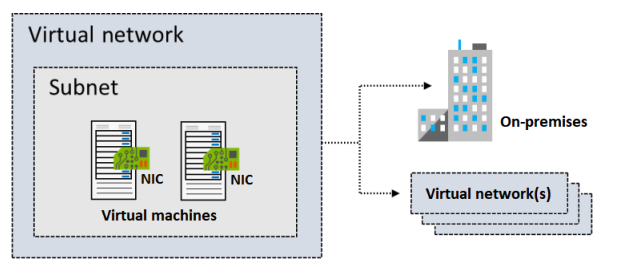
The illustration below shows a virtual network with subnets containing two virtual machines. The virtual network is connected to on-premises infrastructure and a separate virtual network.
Things to Consider When Using a Virtual Network
Virtual networks can be used in various ways. When considering configuration plans for virtual networks and subnets, keep the following scenarios in mind:
| Scenario | Description |
|---|---|
| Create a private cloud-only virtual network | Sometimes you don't need a cross-site configuration. When you create a virtual network, services and VMs within the network can communicate securely with each other in the cloud. You can still configure endpoints for internet-facing communication as needed. |
| Securely extend a data center with a virtual network | You can build a traditional site-to-site VPN to securely extend data center capacity. A site-to-site VPN uses IPSEC to create a secure connection between the organization's VPN gateway and Azure. |
| Enable hybrid cloud scenarios | Virtual networks provide flexibility to support hybrid cloud scenarios. You can securely connect cloud-based apps to any on-premises system, including mainframes and Unix systems. |
Creating Subnets
There are specific rules regarding IP addresses within a virtual network when applying segmentation using subnets:
- Each subnet contains a range of IP addresses that are part of the virtual network's IP allocation.
- Subnet address ranges must be unique within the virtual network.
- Subnet address ranges must not overlap with other subnets in the same virtual network.
- Subnet IP allocations must be defined using CIDR notation.
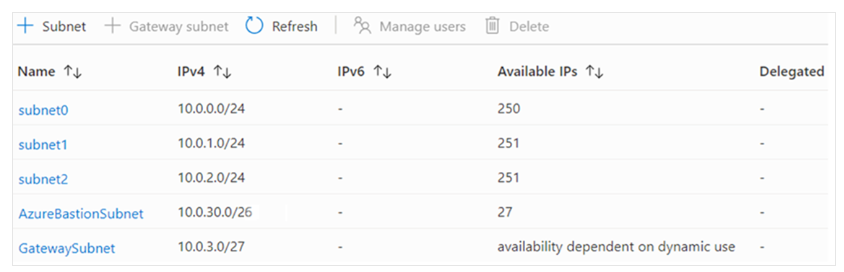
You can divide a virtual network into one or more subnets using the Azure portal. Here are some key characteristics of subnet IP addressing:
Reserved Addresses
For each subnet, Azure reserves five IP addresses—four at the beginning and one at the end.
Let’s review the reserved addresses in the 192.168.1.0/24 range:
| Reserved Address | Reason |
|---|---|
192.168.1.0 | Identifies the virtual network itself. |
192.168.1.1 | Configured by Azure as the default gateway. |
192.168.1.2 and 192.168.1.3 | Reserved for Azure DNS services. |
192.168.1.255 | Used as the broadcast address. |
Things to Consider When Using Subnets
When planning subnet segments in a virtual network, consider the following:
Service Requirements
Some services may require or create their own subnet. Ensure there's enough allocation to meet the service's needs. For example, if you connect a virtual network to an on-premises network using Azure VPN Gateway, a dedicated subnet is required for the gateway.
Network Virtual Appliances
By default, Azure routes traffic between all subnets in a virtual network. You can override this default to prevent subnet-to-subnet routing or to route it through a network virtual appliance.
Network Security Groups (NSGs)
Each subnet can be associated with zero or one NSG. You can use the same or different NSGs for each subnet. An NSG contains rules that allow or deny traffic to/from specific sources and destinations.
Private Link
Azure Private Link enables private connectivity from a virtual network to Azure PaaS services, customer-owned services, or Microsoft partner services. It simplifies the network architecture and secures connectivity by avoiding exposure to the public internet.
Creating a Virtual Network
You can create a new virtual network at any time, including when creating a virtual machine.
Key Requirements for Creating a Virtual Network
| No | Requirement |
|---|---|
| 1 | Define an IP address allocation for the virtual network. |
| 2 | Use IP ranges not already in use in your organization. |
| 3 | IP allocation can be for on-premises or cloud—but not both at once. |
| 4 | Once defined, the IP allocation cannot be changed. Plan ahead if future on-premises connectivity is desired. |
| 5 | Define at least one subnet when creating the network. |
| 6 | Each subnet must have an IP range within the virtual network's allocation. |
| 7 | Subnet address ranges must be unique within the virtual network. |
| 8 | Subnet address ranges must not overlap with others in the same virtual network. |
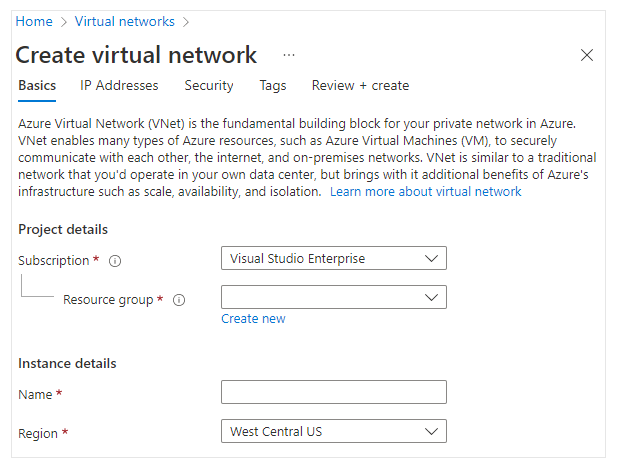
| 9 | Use the Azure portal to specify subscription, resource group, VNet name, and region. |
Default limits on Azure networking resources may change. Refer to Azure networking documentation for the latest info.
IP Addressing Planning
You can assign IP addresses to Azure resources to communicate with other Azure resources, on-premises networks, and the internet.
- Private IP addresses allow communication within Azure virtual networks and on-premises networks. Used when connecting via VPN Gateway or Azure ExpressRoute.
- Public IP addresses allow resources to communicate with the internet. Use this for internet-accessible Azure services.
Below is an illustration of a VM with both private and public IP addresses.

What to Know About IP Addresses
- IP addresses can be static or dynamic.
- You may segment static and dynamic resources into different subnets.
- Static IPs do not change and are ideal for:
| Use Case | Explanation |
|---|---|
| DNS name resolution | IP changes require updating host records. |
| IP-based security models | Apps/services require consistent IP. |
| TLS/SSL certificates tied to IP | Certificate becomes invalid if IP changes. |
| Firewall rules | Require fixed IPs. |
| Role-based VMs (e.g., Domain Controller, DNS Server) | Strongly recommended to use static IPs. |
Explore further with the "Design an IP addressing schema for your Azure deployment" module, which includes a sandbox for hands-on practice.
Creating Public IP Addresses
Considerations for Public IP Address Creation
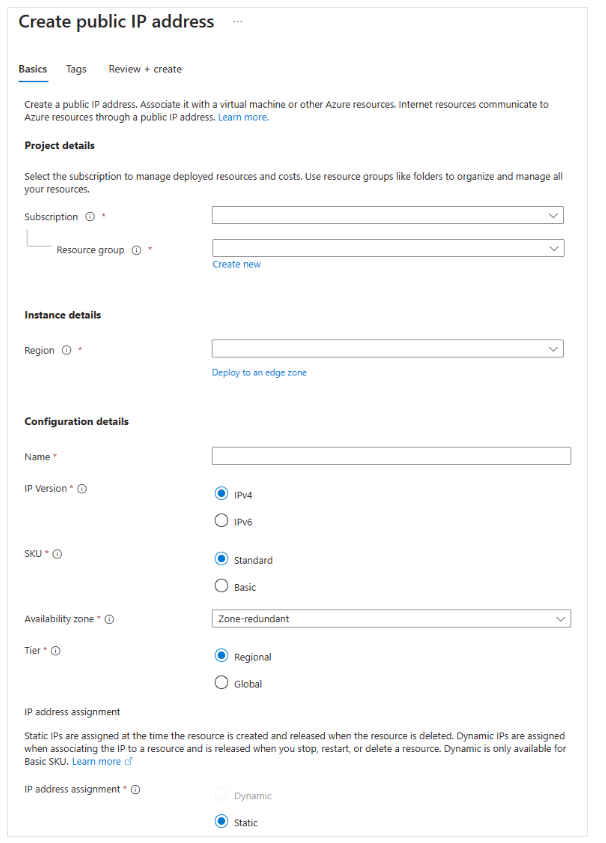
To create a public IP, configure the following settings:
| Setting | Description |
|---|---|
| IP Version | Choose IPv4, IPv6, or Both. |
| SKU | Choose Basic or Standard. Must match Load Balancer SKU if used. |
| Name | Unique name within the resource group. |
| IP Assignment | Choose Dynamic or Static. |
Explanation of IP Assignment Types
-
Dynamic IP
- Assigned when associated with a resource and first powered on.
- May change if the resource is deallocated and restarted.
- Remains the same if restarted from inside the OS.
- Released if disassociated from the resource.
-
Static IP
- Assigned when the public IP resource is created.
- Remains until the resource is deleted.
- Can change assignment type only if unassociated.
- May not be changeable if already in use.
If using IPv6, Dynamic assignment is required for Basic SKU.
For Standard SKU, both IPv4 and IPv6 are always Static.
Associating Public IP Addresses
Public IP resources can be associated with VM NICs, public-facing Load Balancers, VPN gateways, and Application Gateways. They can be either dynamic or static.
Public IP Association Summary
| Resource | Association Method | Dynamic IP | Static IP |
|---|---|---|---|
| Virtual Machine | NIC | Yes | Yes |
| Load Balancer | Front-end configuration | Yes | Yes |
| VPN Gateway | VPN Gateway IP configuration | Yes | Yes * |
| Application Gateway | Front-end configuration | Yes | Yes * |
*Static IPs only available with certain SKUs.
Public IP SKUs
You can choose Basic or Standard SKU when creating a public IP. The SKU affects assignment method, security, supported resources, and redundancy.
| Feature | Basic SKU | Standard SKU |
|---|---|---|
| IP Assignment | Static or Dynamic | Static only |
| Security | Open by default | Secure by default (closed to inbound traffic) |
| Resources | NIC, VPN Gateway, App Gateway, Public Load Balancer | NIC or Standard Public Load Balancer |
| Redundancy | No zone redundancy | Zone-redundant by default |
Allocating Private IP Addresses
Private IPs can be associated with VM NICs, internal load balancers, and application gateways. Azure can assign them dynamically or you can assign them statically.
Private IP Association Summary
| Resource | Association Method | Dynamic IP | Static IP |
|---|---|---|---|
| Virtual Machine | NIC | Yes | Yes |
| Internal Load Balancer | Front-end configuration | Yes | Yes |
| Application Gateway | Front-end configuration | Yes | Yes |
Private IP Assignment
Private IPs are allocated from the subnet's address range where the resource is deployed. There are two options:
Dynamic
Azure automatically assigns the next available IP in the subnet. This is the default assignment method.
Example:
If10.0.0.4to10.0.0.9are already in use, Azure will assign10.0.0.10.
Static
You choose and assign any unused or unreserved IP in the subnet.
Example:
In a10.0.0.0/16subnet, if10.0.0.4to10.0.0.9are used, you can assign from10.0.0.10to10.0.255.254.
For more in-depth learning, check the Introduction to Virtual Networks training module.