Introduction to Azure Load Balancer
Some applications experience extremely high incoming traffic that a single server cannot handle quickly enough. Instead of continuously adding network capacity, processors, disk resources, and RAM, users can manage this traffic with load balancing implementation.
Load balancing is the process of distributing incoming traffic evenly across multiple computers. A group of lower-resource computers can often respond to traffic more effectively than a single high-performance server.
Azure Load Balancer
Azure Load Balancer is an Azure service that enables users to distribute incoming network traffic evenly across a group of Azure VMs, or instances in a Virtual Machine Scale Set.
Azure Load Balancer provides high availability and network performance by:
- Load balancing rules that determine how traffic is distributed to backend instances.
- Health probes that ensure backend resources are healthy and prevent traffic from being sent to unhealthy instances.
Types of Azure Load Balancer
- Public Load Balancer
- Used to distribute traffic from the internet to VMs.
- Maps public IP addresses and incoming port numbers to private IP addresses and ports of VMs in the backend pool.
- Example: distributing web requests from the internet to multiple web servers.
- Can also provide outbound connectivity for VMs inside the virtual network.
- Internal (Private) Load Balancer
- Routes traffic to resources within a virtual network or accessed through VPN to Azure infrastructure.
- The frontend IP address and virtual network are never exposed directly to the internet.
- Suitable for internal (LOB - Line-of-Business) applications running in Azure and accessed only from within Azure or from on-premises resources.
- Used when a private IP address is required on the frontend.
Internal Load Balancing Scenarios
Internal Load Balancer enables several scenarios:
- Within a single virtual network: Load balancing from a VM to a group of other VMs in the same VNet.
- Cross-premises virtual network: Load balancing from on-premises computers to VMs in the VNet.
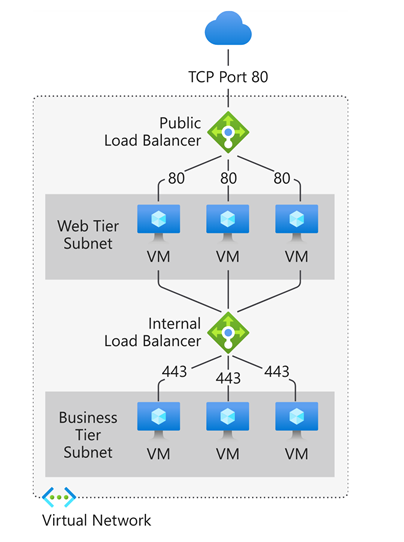
- Multi-tier applications: Load balancing between backend tiers (not facing internet) of applications that have public frontend tiers.
- LOB applications: Load balancing internal business applications hosted on Azure without additional hardware or software load balancers.
Scalability
Each Azure Load Balancer type supports inbound and outbound traffic and can scale to millions of TCP and UDP application flows.
How Azure Load Balancer Works
Azure Load Balancer operates at the transport layer (Layer 4) of the OSI model. Layer 4 functionality enables traffic management based on specific properties such as:
- Source and destination addresses
- TCP or UDP protocol type
- Port number
Azure Load Balancer Components
Key components working together to ensure high availability and application performance include:
- Front-end IP
- Load Balancer rules
- Backend pool
- Health probe
- Inbound NAT rules
- High availability ports
- Outbound rules
Front-end IP
The front-end IP address is the address clients use to access the application. Azure Load Balancer can have multiple frontend IPs, both public and private.
-
Public IP → Public Load Balancer
Maps public IP and port to private IP and port of VMs in the backend pool. Useful for traffic from the internet. -
Private IP → Internal Load Balancer
Used for traffic between resources inside the Virtual Network. Not exposed directly to the internet.
Load Balancer Rules
Load Balancer rules define how traffic is distributed from the frontend IP and port to the backend pool’s IP and port combinations.
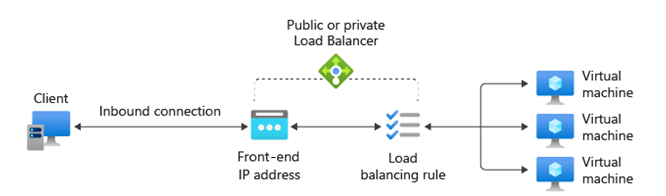
Load Balancer uses a five-tuple hash based on:
- Source IP
- Source port
- Destination IP
- Destination port
- Protocol type (TCP/UDP)
- Session affinity
Load Balancer supports multiple ports and IPs in one rule but does not inspect traffic content (Layer 4 only). For Layer 7 capabilities, use Azure Application Gateway.
Backend Pool
The backend pool is a group of VMs or Virtual Machine Scale Set instances responding to incoming requests.
- To scale effectively, add more instances to the backend pool.
- Load Balancer automatically reconfigures when the number of instances changes.
Health Probe
Health probes check the health of instances in the backend pool. If an instance is unhealthy, the Load Balancer stops sending new traffic to it.
Probe types:
- TCP Probe: Checks if a TCP session can be established on a specific port.
- HTTP/HTTPS Probe: Sends HTTP/HTTPS requests to a specified URI. HTTP 200 response means healthy.
Configurable parameters:
- Port
- URI (for HTTP/HTTPS)
- Interval (time between probes)
- Unhealthy threshold (fail count before marking unhealthy)
Session Persistence
By default, Load Balancer distributes traffic evenly. However, resources can set session affinity so that traffic from the same client always routes to the same instance.
Session persistence options:
- None (default): Requests can be served by any healthy VM.
- Client IP (2-tuple): Traffic from the same IP is always directed to the same instance.
- Client IP + Protocol (3-tuple): Based on IP and protocol type (TCP/UDP).
High Availability Ports
Load Balancer rules configured with protocol: all and port: 0 are called High Availability (HA) port rules.
This rule allows a single rule to balance all TCP and UDP traffic flows across all ports on an internal standard load balancer.
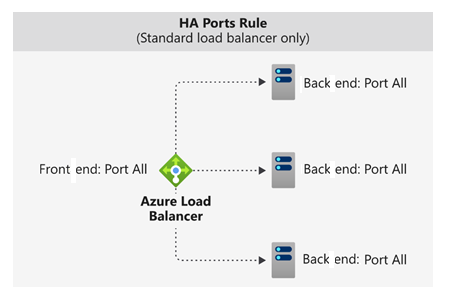
Load Balancing Decision Based on Flow
Load balancing decisions are made per connection flow using the five-tuple:
- Source IP address
- Source port
- Destination IP address
- Destination port
- Protocol
When to Use HA Ports?
HA port rules are useful for critical scenarios such as:
- High availability for Network Virtual Appliances (NVA)
- Large-scale scenarios within a virtual network
- When resources need to balance traffic across a very large number of ports
This feature simplifies configuration and increases efficiency in complex network environments.
Inbound NAT Rules
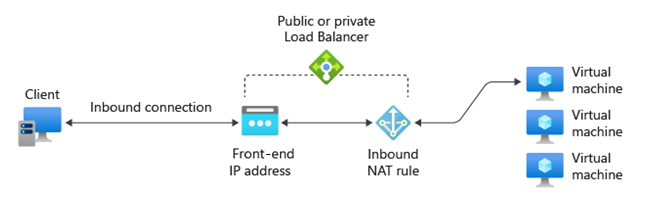
Used to access VMs directly, for example:
- NAT from public Load Balancer IP to TCP port 3389 on a VM for Remote Desktop access.
- Suitable for managing VMs from outside Azure.
Outbound NAT Rules
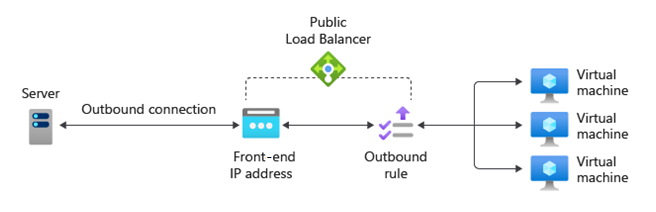
Outbound rules control Source Network Address Translation (SNAT):
- Allow backend pool instances to access the internet.
- Used for outbound communication to the internet or other public services.
When to Use Azure Load Balancer
Azure Load Balancer is ideal for applications requiring very low latency and high performance.
This service suits organizations replacing previous network hardware used to balance traffic across various applications. Those applications used multiple VM tiers on-premises and now run on Azure with similar functionalities.
Because Azure Load Balancer operates at Layer 4 of the OSI model (like previous hardware devices), users can use it to emulate those devices' functionality, such as:
- Health Probes to ensure traffic is not sent to failed VM nodes.
- Session Persistence to ensure clients communicate with the same VM during a session.
Usage Examples
- Configure a public load balancer to handle traffic to the web application tier.
- Configure an internal load balancer to distribute traffic between the web tier and data processing tier.
- Set up inbound NAT rules to access VMs via Remote Desktop Protocol (RDP) for administrative purposes.
Azure Load Balancer is not suitable if you only run a single VM instance for a web application without load balancing needs.
For example, if the web app receives low traffic and existing infrastructure handles the load well:
- No backend pool is needed.
- No need for Azure Load Balancer.
Alternatives to Azure Load Balancer
Azure provides several other load balancing solutions, including:
- Azure Front Door
- Global application delivery and site acceleration service.
- Supports Layer 7: TLS/SSL offload, path-based routing, fast failover, web application firewall, caching.
- Suitable for multi-region scenarios.
- Azure Traffic Manager
- DNS-based load balancer for cross-region traffic distribution.
- Provides high availability and responsiveness.
- Works at the domain level with slower failover than Front Door due to DNS caching and TTL limitations.
- Azure Application Gateway
- Provides Application Delivery Controller (ADC) as a service.
- Supports Layer 7 features, such as TLS/SSL offload for CPU efficiency.
- Operates within a single Azure region, not global.
Azure Load Balancer is a Layer 4 service supporting TCP and UDP traffic, with high performance and very low latency.
- Handles millions of requests per second
- Zone-redundant to ensure high availability
If your application requires a Web Application Firewall (WAF), Azure Load Balancer is not the right solution.