Managing and Controlling Traffic Flow in Azure Deployment Using Routes
Identify Routing Capabilities in Azure Virtual Network
To control traffic flow in a virtual network, users need to understand the purpose and benefits of custom routes. They should also know how to configure routes to direct traffic through a Network Virtual Appliance (NVA).
Routing in Azure
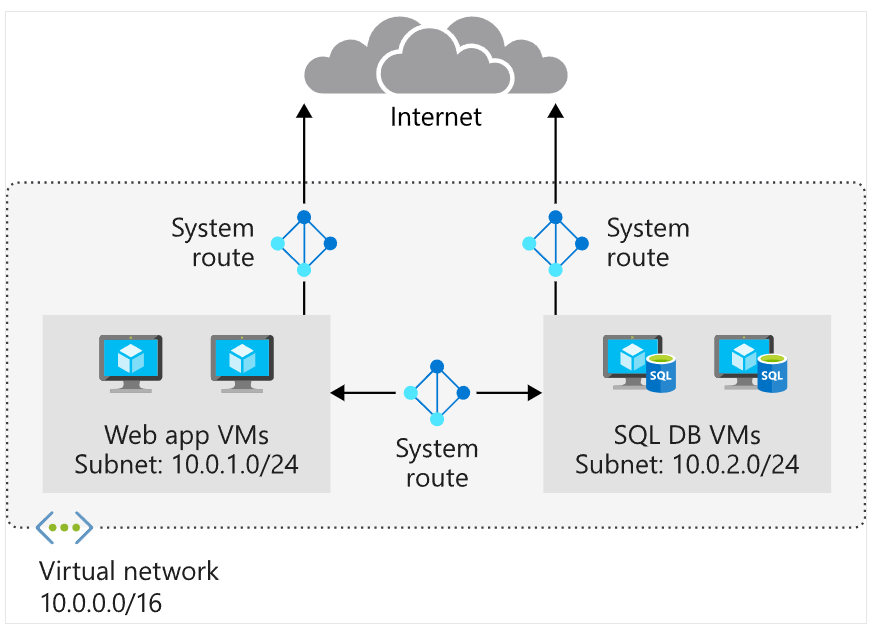
Network traffic in Azure is automatically routed across Azure subnets, virtual networks, and on-premises networks. System routes govern this routing and are assigned by default to every subnet in a virtual network.
With system routes, any Azure virtual machine deployed in a virtual network can communicate with one another and can also be accessed from hybrid networks or the internet.
Users cannot create or delete system routes but can override them by adding custom routes to control traffic flow to the next hop.
Default System Routes in Each Subnet:
| Address Prefix | Next Hop Type |
|---|---|
| Unique to VNet | Virtual network |
| 0.0.0.0/0 | Internet |
| 10.0.0.0/8 | None |
| 172.16.0.0/12 | None |
| 192.168.0.0/16 | None |
| 100.64.0.0/10 | None |
Next Hop Type shows the path traffic takes for each address prefix:
- Virtual network: Route created for each address range at the virtual network level.
- Internet: The default system route
0.0.0.0/0sends all traffic to the internet unless overridden by a custom route. - None: Traffic to these addresses is dropped. Private IPv4 addresses like
10.0.0.0/8,172.16.0.0/12, and192.168.0.0/16are blocked by default.
Additional System Routes
Azure creates additional routes when the following features are enabled:
- Virtual network peering
- Service chaining
- Virtual network gateway
- Virtual network service endpoint
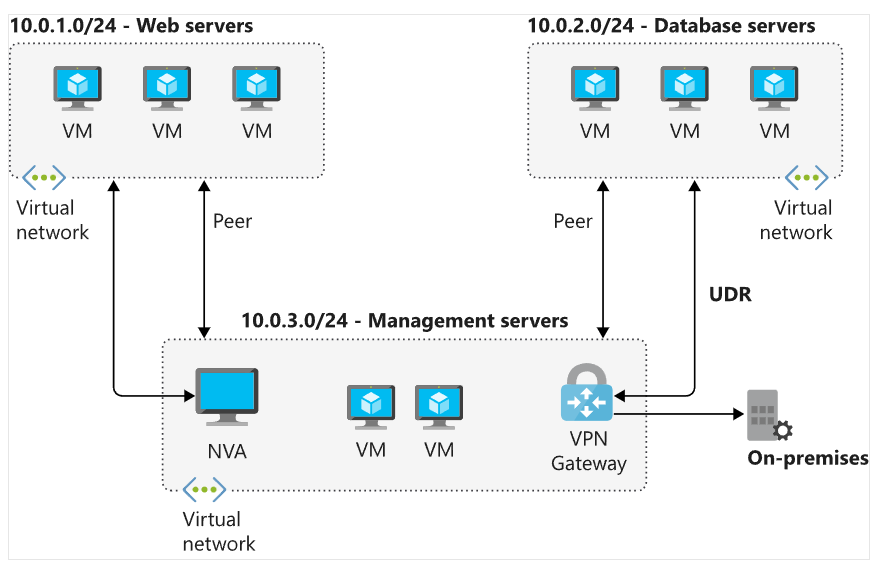
- Virtual Network Peering and Service Chaining
Peering allows communication between VNets across the same or different regions. Service chaining allows overriding routes with user-defined routes.
- Virtual Network Gateway
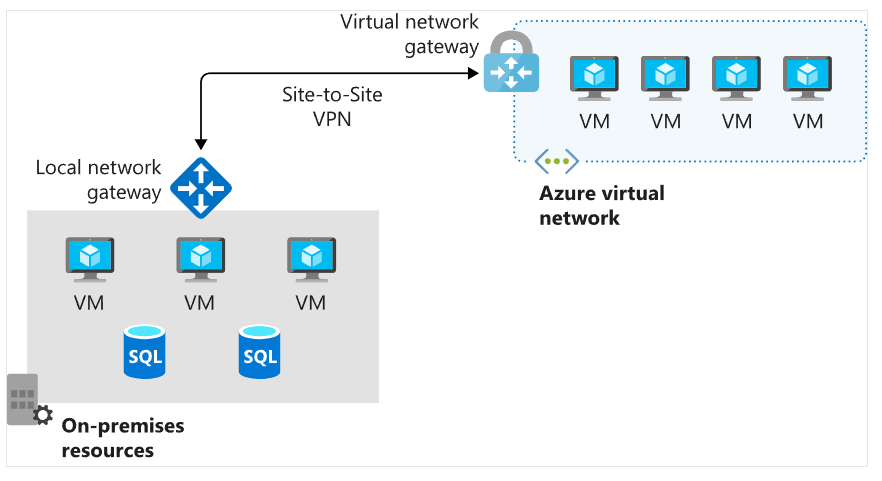
Used to send encrypted traffic between Azure and on-premises networks over the internet, or between two Azure networks.
- Virtual Network Service Endpoint
Service endpoints extend private address space and allow direct connectivity to certain Azure services (e.g., Storage) without routing through the public internet.
Custom Route
Although system routes are sufficient in many cases, users often want more control over traffic flow, such as routing through a firewall or NVA.
- Custom Route Options
- User-defined route (UDR): Manually created by the user
- Border Gateway Protocol (BGP): Automatically exchanged between Azure and on-premises networks
- User-defined Routes
With UDR, users can override system routes to direct traffic through:
- Virtual appliance: Usually a firewall, specified using the private IP of a VM NIC or internal load balancer.
- Virtual network gateway: For VPN-bound traffic.
- Virtual network: Overrides default route within the VNet.
- Internet: Routes traffic to the internet.
- None: Drops traffic to certain destinations.
❌ You cannot use VirtualNetworkServiceEndpoint as a next hop in UDR.
- Service Tags for Custom Routes
Users can use service tags instead of direct IPs. Tags represent IP prefix groups for specific Azure services. Microsoft updates these tags automatically, so there's no need to manually update routes when IPs change.
Border Gateway Protocol (BGP)
BGP is the standard protocol for route exchange between networks. It is used with:
- Azure ExpressRoute
- Site-to-site VPN

BGP improves stability by allowing routers to quickly select an alternative path if the primary path fails.
- Route Selection and Priority
If multiple routes are available, Azure chooses:
-
Route with the longest prefix (most specific)
e.g.,10.0.0.0/24is preferred over10.0.0.0/16. -
If multiple routes have the same prefix, the priority order is:
- User-defined routes
- BGP routes
- System routes
Network Virtual Appliance
A Network Virtual Appliance (NVA) is a virtual device with multiple layers, such as:
- Firewall
- WAN optimizer
- Application delivery controller
- Router
- Load balancer
- IDS/IPS
- Proxy
Users can deploy NVAs from providers available in the Azure Marketplace, such as Fortigate, Cisco, Check Point, Barracuda, Sophos, WatchGuard, and SonicWall.
NVA can be used to:
- Filter traffic entering the virtual network
- Block malicious requests
- Block requests from untrusted sources
Scenario: Retail Organization
In this scenario, users work with the security and network teams to deploy a secure environment. The goal is to:
- Inspect all incoming traffic
- Block unauthorized traffic
- Protect VM networks and Azure services
Main goal: Prevent unwanted or unsafe network traffic from reaching critical parts of the system.
Network Virtual Appliance
A Network Virtual Appliance (NVA) is a virtual machine that controls network traffic flow by managing routing. NVAs are typically used to control traffic from the perimeter network to other networks or subnets.
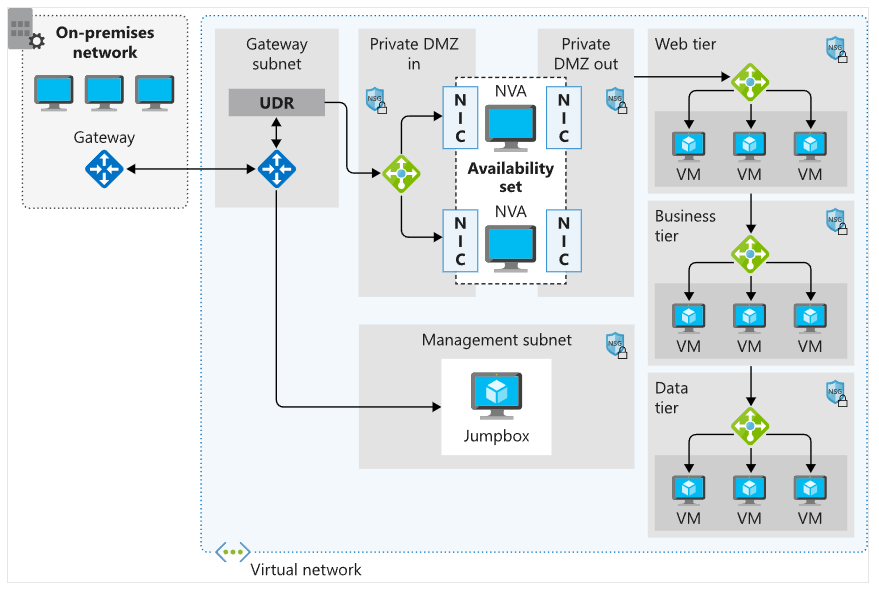
Users can configure firewalls in virtual networks in several ways:
- Place firewalls in a perimeter subnet
- Use a microsegmentation approach for tighter security control
Microsegmentation
With microsegmentation, users:
- Create a dedicated subnet for firewalls
- Place web apps and other services in separate subnets
- Route all traffic through the firewall to be inspected by the NVA
- Enable forwarding on the appliance’s network interface to send traffic to the correct subnet
Firewalls can inspect packets at Layer 4 (transport) and, for advanced devices, up to Layer 7 (application).
When deployed in Azure, NVAs act as routers, forwarding requests between subnets within the virtual network.
Some NVAs require multiple network interfaces:
- One for management
- Others for data traffic
After deployment, users can configure NVAs to forward traffic through the appropriate interfaces.
User-defined Routes (UDR)
By default, Azure provides system routes to get started. However, in some cases, users need to create route tables and add custom routes, such as:
- Internet access through on-premises networks using forced tunneling
- Controlling traffic via virtual appliances (NVAs)
- Users can create multiple route tables in Azure.
- Each route table can be associated with one or more subnets.
- However, a subnet can only be associated with one route table.
High Availability for NVAs
- If traffic is routed through NVAs, the NVA becomes a critical component of the infrastructure. NVA failure can impact communication.
- Therefore, it's essential to implement a high availability architecture when deploying NVAs.
- Azure offers several methods to ensure high availability for NVAs.