Configure Azure Virtual Network Peering
Using Azure Virtual Network Peering
Perhaps the simplest and quickest way to connect virtual networks is by using Azure Virtual Network Peering. Virtual Network Peering allows users to connect two Azure virtual networks seamlessly. Once peered, the virtual networks operate as a single network for connectivity purposes.
Key Points About Azure Virtual Network Peering
Here are some important characteristics of Azure Virtual Network Peering.
There are two types of Azure Virtual Network Peering: regional and global.

- Regional virtual network peering connects Azure virtual networks in the same region.
- Global virtual network peering connects Azure virtual networks in different regions.
- You can create regional peering for virtual networks in the same Azure public cloud region, the same China cloud region, or the same Microsoft Azure Government region.
- You can create global peering for virtual networks in any Azure public cloud or China cloud region.
- Global peering for virtual networks in different Azure Government regions is not allowed.
- Once peering is established, virtual networks remain managed as separate resources.
- Virtual networks can be peered across subscriptions and tenants.
Considerations When Using Azure Virtual Network Peering
| Benefit | Description |
|---|---|
| Private network connection | When Azure Virtual Network Peering is implemented, traffic between peered virtual networks remains private. The traffic stays on the Microsoft Azure backbone network. Public internet, gateways, or encryption are not required for inter-network communication. |
| Strong performance | Because it uses Azure infrastructure, Virtual Network Peering provides low-latency and high-bandwidth connections between resources in different virtual networks. |
| Simplified communication | Resources in one virtual network can communicate with those in another once peering is established. |
| Seamless data transfer | Peering enables data transfer across subscriptions, deployment models, and Azure regions. |
| No resource downtime | Peering does not require downtime for resources in either virtual network during or after the peering process. |
Understanding Gateway Transit and Connectivity
When virtual networks are peered, you can configure an Azure VPN Gateway in one of the peered virtual networks as a transit point. In this scenario, a peered virtual network uses the remote VPN gateway to access other resources.
Transit and Connectivity Usage
Consider a scenario where three virtual networks in the same region are connected via peering. Virtual Network A and Virtual Network B are peered with a hub virtual network. The hub contains resources including a gateway subnet and Azure VPN Gateway. The VPN Gateway is configured to allow gateway transit. Virtual Network B accesses hub resources using the remote VPN Gateway.
Diagram of regional virtual network peering. One network allows VPN gateway transit and uses the remote VPN gateway to access resources in the hub virtual network.

Azure Portal does not explicitly label gateway transit and connectivity. Instead, it provides options to allow and forward network traffic. Can you distinguish the difference between those options?
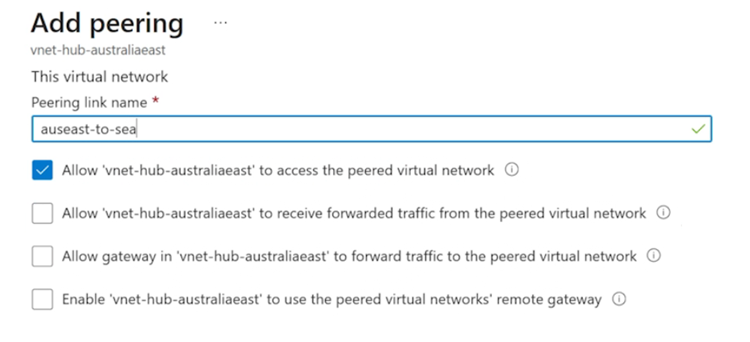
Key Points About Azure VPN Gateway
Let’s take a closer look at how Azure VPN Gateway integrates with Virtual Network Peering.
| Key Point About Azure VPN Gateway | Description |
|---|---|
| One VPN Gateway per Virtual Network | Each virtual network can only have one VPN Gateway. |
| Gateway Transit Support | Gateway transit is supported for both regional and global virtual network peering. |
| Communication Beyond Peering | With gateway transit enabled, a virtual network can communicate with resources beyond the peering scope. |
| Hub Gateway Subnet Tasks Examples | - Use site-to-site VPN to connect to on-premises networks. |
| - Use vnet-to-vnet connections to other virtual networks. | |
| - Use point-to-site VPN to connect to clients. | |
| Sharing Gateway via Gateway Transit | Gateway transit allows peered networks to share a gateway and access external resources—no need to deploy a VPN Gateway in each peered network. |
| Network Security Groups (NSG) Settings | NSGs can be used to allow or block access between virtual networks or subnets. Peering enables control over NSG rules across virtual networks. |
Creating Virtual Network Peering
Virtual network peering can be configured using PowerShell, Azure CLI, or the Azure Portal. In this module, we’ll walk through the steps to create peering in the Azure Portal for virtual networks deployed using Azure Resource Manager.
Key Points Before Creating Virtual Network Peering
-
To implement virtual network peering, your Azure account must have the Network Contributor role.
Alternatively, you can use a custom role with the required peering actions. For details, see Permissions. -
You need two virtual networks to create a peering.
-
The second virtual network in the peering is called the remote network.
-
Initially, VMs in different virtual networks cannot communicate with each other. After peering is created, communication is possible based on configuration settings.
How to Check Peering Status
In the Azure Portal, you can check the connectivity status of virtual networks in a peering. The status depends on the deployment model.
Peering is not considered successful until both virtual networks show a Connected status.
-
For Resource Manager deployments, the primary statuses are Initiated and Connected. For classic models, the Updating status is also used.
-
When you initiate peering from one virtual network to another, the peering status on the initiating network is Initiated.
-
When you create a corresponding peering from the remote network back to the first one, the status for both becomes Connected. The Azure Portal will show the status on the first network change from Initiated to Connected.
Extending Peering with User-Defined Routes (UDR) and Service Chaining
Virtual network peering is non-transitive. Communication is limited to networks and resources directly involved in the peering. Other mechanisms must be used to route traffic to or from resources outside the peered networks.
For example, you have three virtual networks: A, B, and C. You create a peering between A and B, and between B and C, but not between A and C. Peering between B and C does not automatically allow communication between A and C.
Key Points About Extending Peering
There are several ways to extend peering capabilities to other resources and virtual networks.
| Mechanism | Description |
|---|---|
| Hub and Spoke Network | In this model, the hub virtual network hosts infrastructure components like a network virtual appliance (NVA) or Azure VPN Gateway. All spoke virtual networks peer with the hub, allowing traffic to flow through the NVA or VPN Gateway. |
| User-Defined Routes | Virtual network peering supports using a VM IP or VPN Gateway as the next hop in a user-defined route. |
| Service Chaining | Service chaining directs traffic from one virtual network to a virtual appliance or gateway. To enable service chaining, configure UDRs that point to a VM in the peered network or to a virtual network gateway as the next hop IP. |
The diagram below shows a hub-and-spoke virtual network topology with an NVA and VPN Gateway.
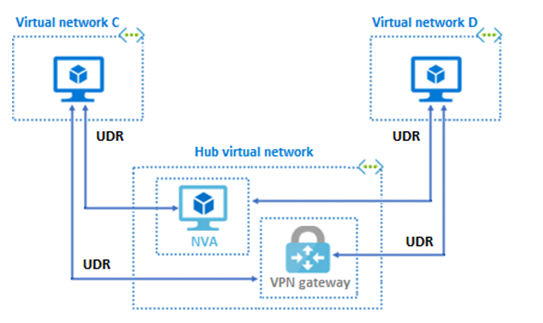
This hub-and-spoke topology can be accessed by other virtual networks using user-defined routes and service chaining.