Securing Azure Resources with Role-Based Access Control (RBAC)
First, keep in mind that each Azure subscription is associated with a single Microsoft Entra directory.
Users, groups, and applications in that directory can manage resources within the Azure subscription.
When an account is deactivated, access to all Azure resources connected to Microsoft Entra ID is automatically revoked.
What is Azure RBAC?
For organizations using cloud services, securing Azure resources such as virtual machines, websites, networks, and storage is crucial. Organizations want to ensure that their data and assets are protected while still providing employees and partners the access they need to do their jobs.
Azure RBAC (Role-Based Access Control) is an authorization system in Azure that helps manage who has access to Azure resources,
what they can do with those resources, and where they have access.
Azure RBAC is built on top of Azure Resource Manager and provides fine-grained access management for Azure resources.
With Azure RBAC, organizations can grant the right access based on the user’s role to get their work done.
For example, one employee might manage virtual machines in a subscription, while another manages SQL databases in the same subscription.
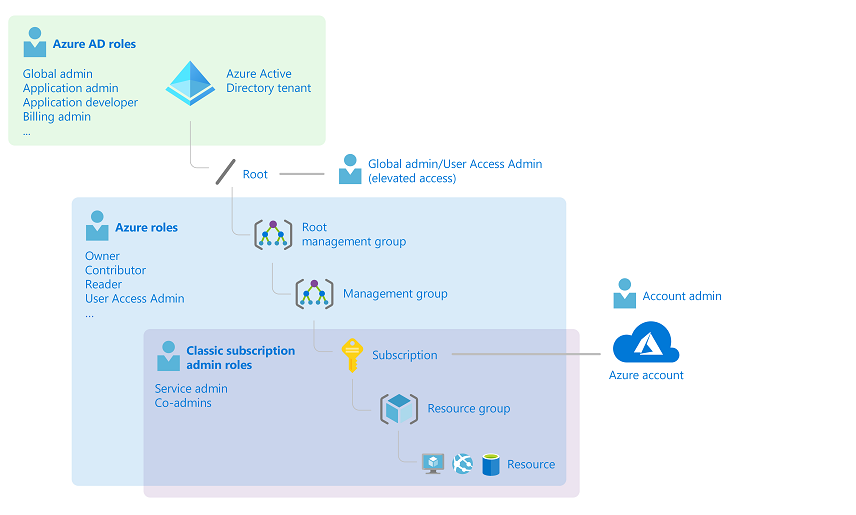
In the diagram above, one subscription is only associated with one Microsoft Entra tenant.
Note that one resource group can contain many resources, but it is linked to only one subscription,
and each resource can only be associated with one resource group.
Organizations can grant access by assigning appropriate Azure roles to users, groups, or applications at a specific scope. This scope could be a management group, subscription, resource group, or individual resource, and is inherited based on the hierarchy. For example, if a user has access to a resource group, they can manage all resources within it such as websites, virtual machines, and subnets.
Azure RBAC in Azure Portal
In the Azure Portal, users will find an Access control panel known as Identity and Access Management (IAM). In this panel, users can view who has access, what their roles are, and grant or revoke access at a defined scope. Example: Alain has been given the Backup Operator role for a specific resource group.

How Azure RBAC Works
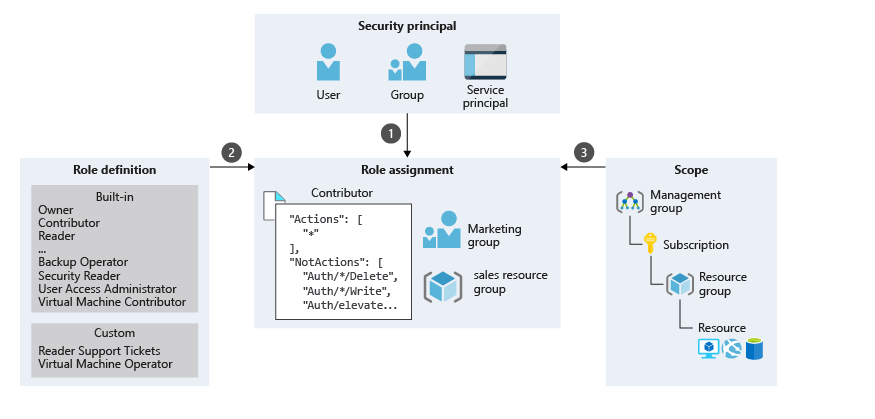
You can control access to resources using Azure RBAC by creating role assignments, which define how permissions are enforced. To create a role assignment, you need three elements: security principal (who), role definition (what), and scope (where).
Security Principal (Who)
This is the user, group, or application (service principal) you want to give access to.

Role Definition (What)
Specifies the permissions the role grants, such as read, write, and delete. Roles can be broad like Owner, or more specific like Virtual Machine Contributor.
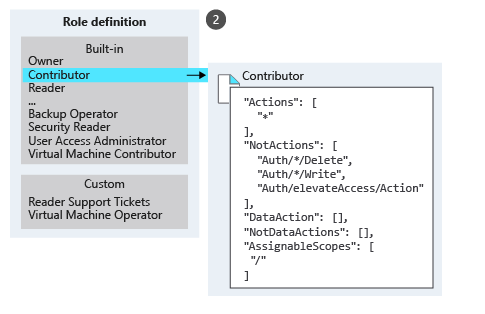
Examples of built-in roles in Azure:
- Owner: Full access to all resources, including assigning access to others.
- Contributor: Can create and manage all types of Azure resources but cannot assign access.
- Reader: Can view resources only.
- User Access Administrator: Manages user access to Azure resources.
You can also create custom roles.
Scope (Where)
Scope defines the level at which access is applied. This is useful when you want someone to be a Website Contributor but only for a specific resource group.

In Azure, you can define scope at several levels: management group, subscription, resource group, or resource. Scopes follow an inheritance model. When you grant access at a parent scope, all child scopes inherit the permissions.
Role Assignment
This is the process of granting (or revoking) access. Example: The marketing group is granted the Contributor role on the Sales resource group.
Azure RBAC is an Allow Model
Azure RBAC uses an allow model. That means, when a user is assigned a role, they are granted permission to perform certain actions such as reading, writing, or deleting. If a user has two role assignments—one granting read access and another write access—they receive both permissions. By default, these are called Actions.
Azure RBAC also includes NotActions, which is a list of actions that are not allowed. This is useful when assigning many roles to a user but wanting to restrict just a few specific actions.
Example: If you want to assign nearly all permissions to a user but exclude just a few, using NotActions simplifies role assignment
and makes it more efficient.
-
Azure RBAC (Role-Based Access Control) is a role-based authorization system in Azure that allows organizations to manage access to resources in a detailed manner.
-
The three main elements of role assignment:
- Security Principal (Who): The user, group, or application being granted access.
- Role Definition (What): A set of permissions (such as read, write, delete) defined by the role.
- Scope (Where): The level at which access is applied—management group, subscription, resource group, or resource.
-
Scope is hierarchical and inherited, so access granted at a higher level is also valid for all lower levels.
-
Azure offers built-in roles, and users can create custom roles as needed.
-
NotActionsallows exclusion of specific actions from permissions and is efficient for role assignment.