Azure Policy Initiatives
Azure Policy Initiatives are collections of multiple Azure Policy definitions grouped within an organization to:
- Centrally manage and enforce policies on Azure resources.
- Accelerate compliance with national or regional standards and regulations.
- Simplify audits and speed up policy implementation.
- Automate deployments to ensure consistency and efficiency in resource management.
- Create policy solutions tailored to specific organizational needs.
Cloud Adoption Framework in Azure
The Cloud Adoption Framework (CAF) is Microsoft's comprehensive technical guidance to help organizations adopt Azure cloud technology efficiently and securely, covering both business and technology strategies.
Below is a diagram illustrating the phases of the cloud adoption lifecycle based on the Cloud Adoption Framework.

Considerations in Applying Policies for Cloud Governance
There are two important aspects to consider when applying policies for cloud governance:
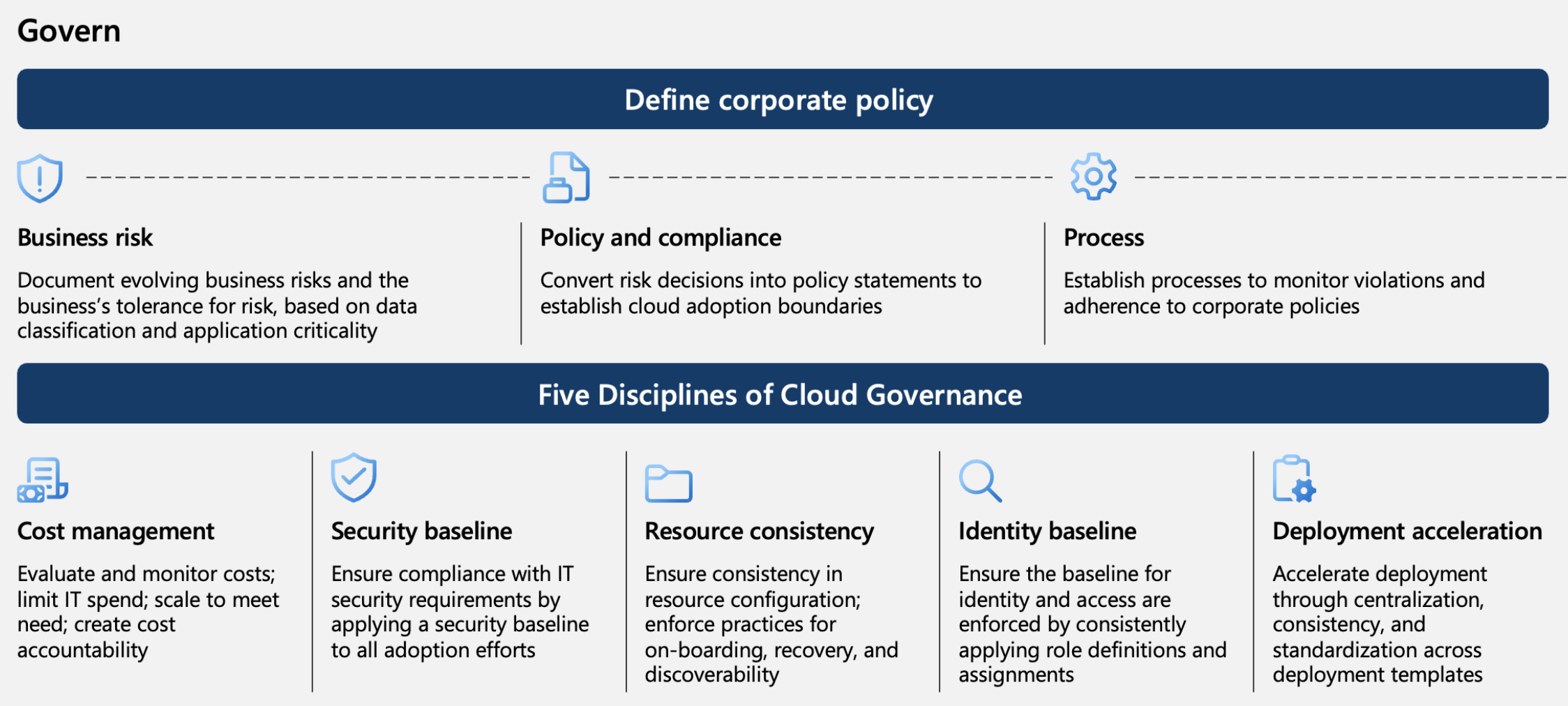
1. Defining Corporate Policy
- Business risk – Periodically document business risks based on data classification and application criticality.
- Policy and compliance – Apply policies based on risk by setting efficient cloud adoption rules.
- Sustainability – Monitor policy violations and compliance within the organization.
2. Applying the 5 Disciplines of Cloud Governance
- Cost management – Evaluate and monitor costs, ensuring resources are used according to need.
- Security standards – Ensure compliance with IT security standards across all cloud adoption efforts.
- Consistency – Guarantee configuration consistency across resources.
- Identity standards – Maintain consistent identity and access standards through defined role assignments.
- Deployment acceleration – Speed up policy application via centralized, consistent, and standardized templates.
The Cloud Adoption Framework includes best practices, documentation, and tools contributed by Microsoft, partners, and customers to shape and execute effective cloud business and technology strategies.
Read More: Cloud Adoption Framework
Azure Policy Design Principles
When implementing governance, it is important to understand the hierarchy of Management Infrastructure in Azure to apply policies that ensure security and cost management based on required resources.
Relationship between Azure Policy and Azure Resource Management
Azure Resource Management (ARM) is a management and deployment service for Azure resources. Azure Resource Management operates in two areas:
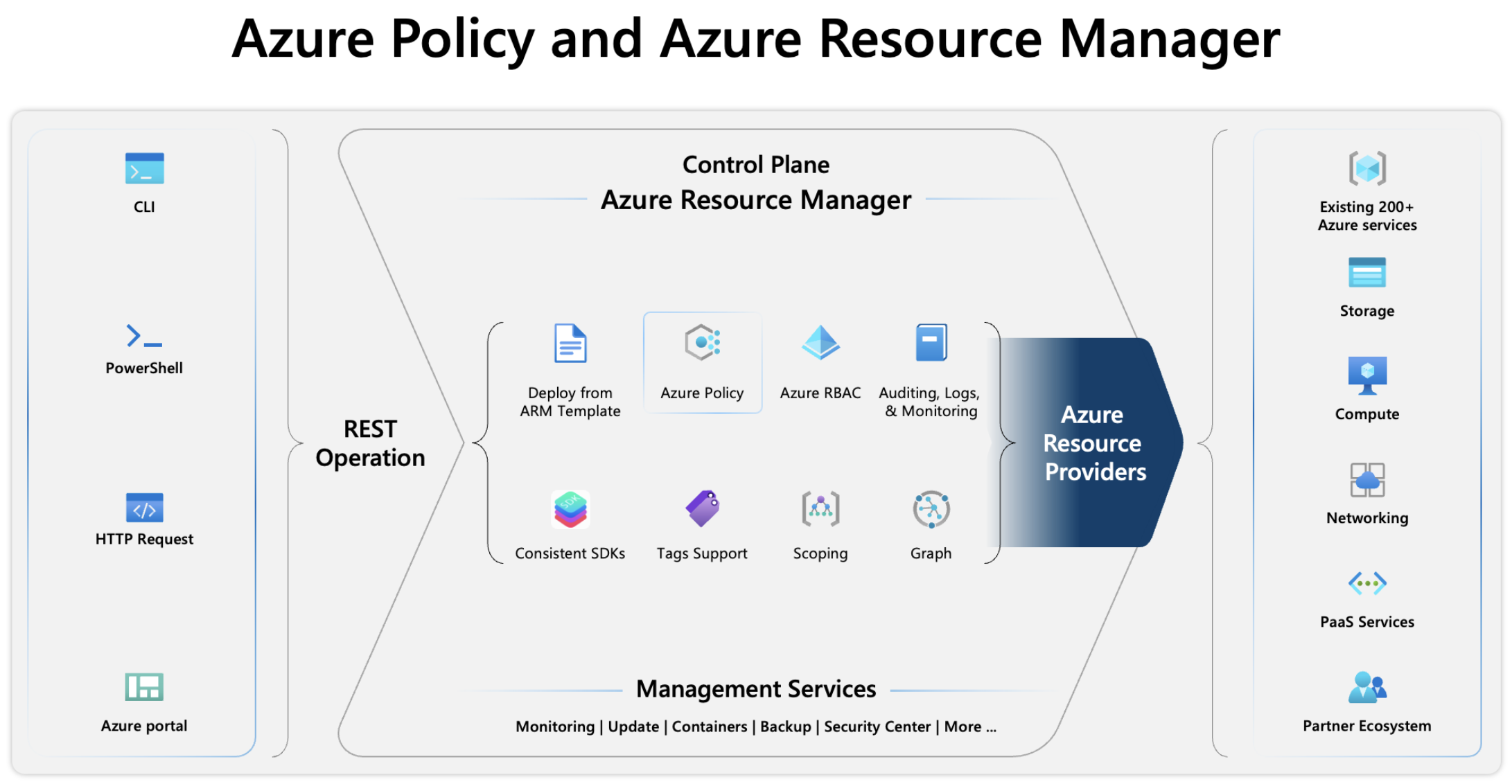
1. Control Plane
Azure Policy works on the control plane to enforce rules and compliance on resources. Azure Resource Manager manages all control plane operations and includes centralized components. Azure Policy integrates with Azure Resource Manager.
2. Data Plane
The data plane is where direct interactions with resources occur, and Azure Policy ensures that any interaction complies with the applied policies.
Operational Flow in Azure Resource Management
Azure Resource Management handles resource requests in two scenarios: Greenfield and Brownfield. When deploying resources, Azure Resource Management determines whether the resource is newly created or an update to an existing one.
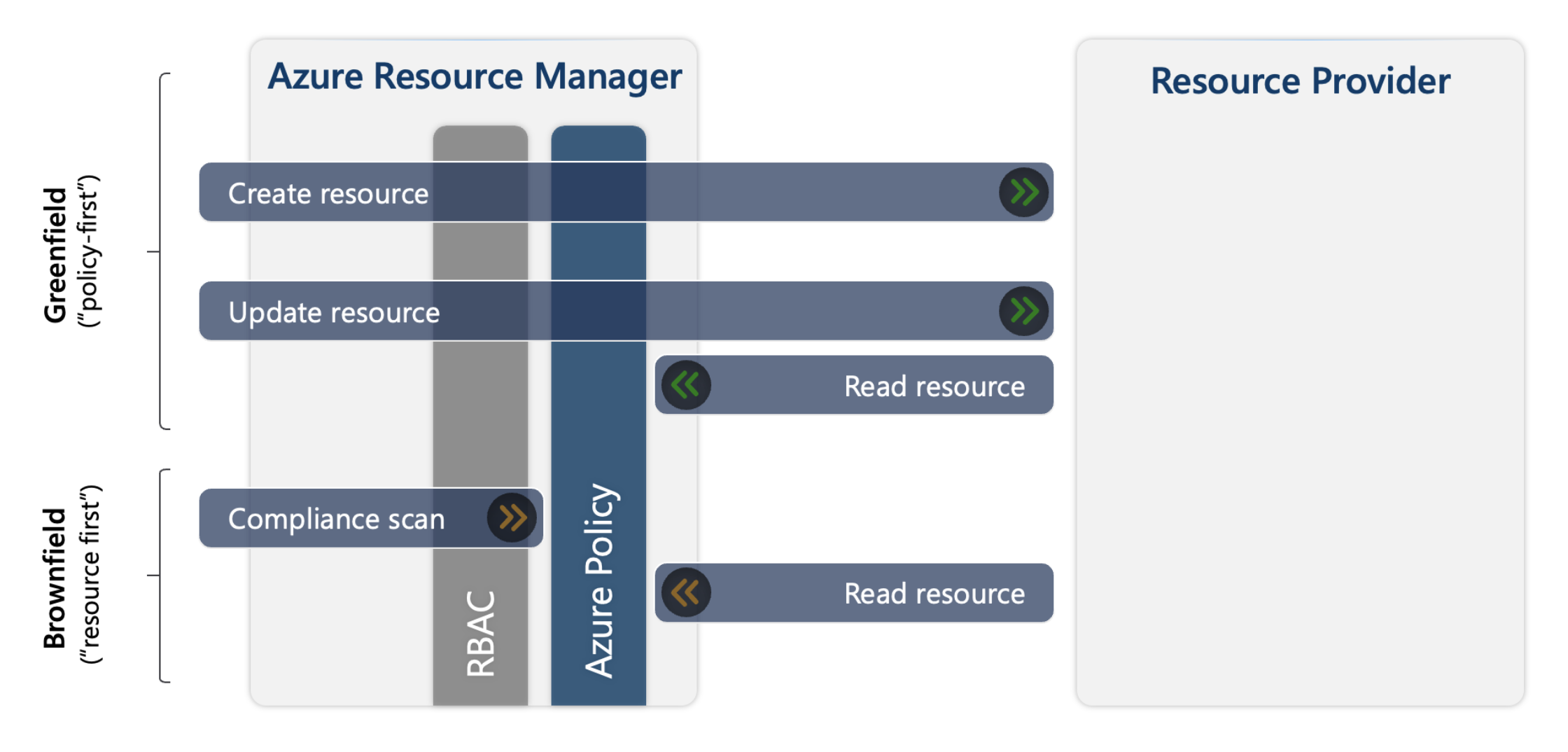
- Greenfield: Refers to scenarios where a policy exists at the time of resource creation or update.
- Brownfield: Refers to scenarios where resources already exist before a new policy is applied; such resources are considered non-compliant.
Azure Policy Resources
Azure Policy evaluates resources and interactions in Azure by comparing property values against applied policies. There are six core Azure Policy resource concepts:
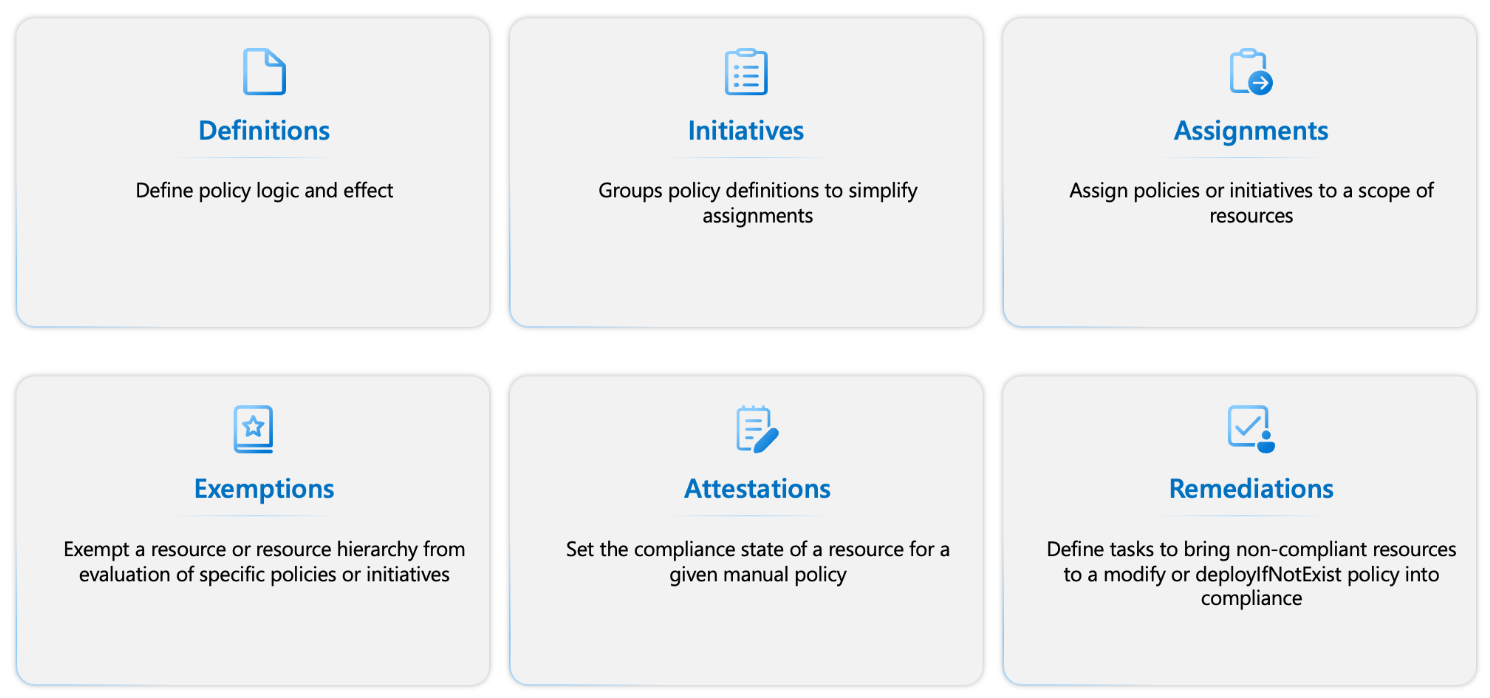
- Definitions – Define compliance conditions and their effects when evaluated within a specified scope.
- Initiatives – A set or group of policy definitions for simplified management and application. Includes Built-in policies and Built-in initiatives provided by Azure Resource Providers.
- Assignments – Specify the resources to be evaluated against a definition or initiative.
- Exemptions – Exclude specific resources from evaluation by a definition or initiative.
- Attestations – Formal approvals for manual Azure policies (not built-in), created based on organizational rules and conditions.
- Remediations – Actions to bring non-compliant resources into compliance using modify or deployIfNotExist definitions. Automatically created resources can also be made compliant through remediation.
Azure Policy Definition
An Azure Policy definition describes resource compliance conditions and the actions or effects that occur when those conditions are met. A policy consists of two parts:
- A condition that compares a resource’s property (accessed using aliases) to a defined value.
- An effect that determines what happens when the policy is evaluated and the condition is met. Effects differ for new, updated, and existing resources.
Structure of a Policy Definition
Policy definitions use the JSON format.
| Element | Description | Property or Value |
|---|---|---|
displayName (string, max 128 chars) | Identifies the policy definition. | — |
description (string, max 512 chars) | Provides context for when the definition is used. | — |
policyType (string, read-only) | Indicates the origin of the policy definition. Cannot be set manually. SDK returns one of three values: | ● Built-in: Provided and maintained by Microsoft. ● Custom: User-created definitions. ● Static: Microsoft-owned compliance policies. |
mode (string) | Configured based on the target of the policy: ARM or Resource Provider. | ARM Modes: • On All • Indexed Fully Supported Resource Provider Modes: • Microsoft.Kubernetes.Data • Microsoft.KeyVault.Data • Microsoft.Network.Data Preview Modes: • Microsoft.ManagedHSM.Data • Microsoft.DataFactory.Data |
version (string, optional) | Built-in definitions may have multiple versions under the same definitionID. If unspecified, the latest version is used. | — |
metadata (object, optional, max 1024 chars) | Stores information about the policy definition. | Common properties: • version• category• preview• deprecated• portalReview |
parameters (object, optional) | Simplifies policy management by reducing the number of definitions. | Properties: • name• type (String, Array, Object, Boolean, Integer, Float, DateTime)• metadata (description, displayName, strongType, assignPermissions)• defaultValue• allowedValues• schema |
policyRule (object) | Defines the effect of the policy. Consists of if and then blocks. | • if: Condition for applying the policy • then: Effect when if is met |
{
  "displayName": "Allowed locations",
  "description": "This policy enables you to restrict the locations your organization can specify when deploying resources. Use to enforce your geo-compliance requirements. Excludes resource groups, Microsoft.AzureActiveDirectory/b2cDirectories, and resources that use the 'global' region.",
  "policyType": "BuiltIn",
  "mode": "Indexed",
  "metadata": {
    "version": "1.0.0",
    "category": "General"
  },
  "parameters": {
    "listOfAllowedLocations": {
      "type": "Array",
      "metadata": {
        "description": "The list of locations that can be specified when deploying resources.",
        "strongType": "location",
        "displayName": "Allowed locations"
      }
    }
  },
  "policyRule": {
    "if": {
      "allOf": [
        {
          "field": "location",
          "notIn": "[parameters('listOfAllowedLocations')]"
        },
        {
          "field": "location",
          "notEquals": "global"
        },
        {
          "field": "type",
          "notEquals": "Microsoft.AzureActiveDirectory/b2cDirectories"
        }
      ]
    },
    "then": {
      "effect": "deny"
    }
  }
}
In the example above, b2cDirectories are excluded from the policy rule because their location field is not a specific region (their locations might be listed as "United States," "Europe," "Asia Pacific," or "Australia").
Logical Operators and Their Conditions (if blocks)
The first part of the policyRule in an Azure Policy definition is the if block. This block defines the conditions used by the rule to evaluate resources.
A rule definition can contain multiple condition statements. Depending on the evaluation logic used, it may require all statements to be true, or just some of them.
| Operator | Type | Description |
|---|---|---|
not | {condition or operator} | The not syntax inverts the result of the condition. |
allOf | [{condition or operator}, {condition or operator}] | The allOf syntax (like the logical and operation) requires all conditions to be true. |
anyOf | [{condition or operator}, {condition or operator}] | The anyOf syntax (like the logical or operation) requires one or more conditions to be true. |
Let’s review the logic section from the previous policy definition:
{
  "if": {
    "allOf": [
      {
        "field": "location",
        "notIn": "[parameters('listOfAllowedLocations')]"
      },
      {
        "field": "location",
        "notEquals": "global"
      },
      {
        "field": "type",
        "notEquals": "Microsoft.AzureActiveDirectory/b2cDirectories"
      }
    ]
  },
  "then": {
    "effect": "deny"
  }
}
This policy will deny (effect: deny) the deployment if all conditions are met (allOf):
- The location is not included in the (notIn) listOfAllowedLocations → Meaning locations outside of the defined list.
- The location is not equal to (notEquals) global → Meaning locations other than global.
- The type is not equal to (notEquals) b2cDirectories → Meaning the resource is not in a B2C Directory.
Nested Logical Operators
Logical operations are optional and can be nested to create complex scenarios. The following example shows a not operator nested inside an allOf operator:
"if": {
    "allOf": [
      {
        "not": {
          "field": "tags",
          "containsKey": "application"
        }
      },
      {
        "field": "type",
        "equals": "Microsoft.Storage/storageAccounts"
      }
    ]
  },
  "then": {
    "effect": "deny"
  }
This policy will deny (effect: deny) the deployment if all conditions are met:
- There is no tag with the key
application(checked usingcontainsKey) - The resource is of type
storageAccounts
The logic results in the following outcomes:
Deployment Allowed:
- A
storageAccountsresource that has a tag with keyapplication - Any other resource type (not
storageAccounts), even if it has no tag
Deployment Denied:
- A
storageAccountsresource that does not have the required tag
Conditions
Properties like fields, values, or counts can be evaluated within a condition.
| Property | Description |
|---|---|
| Fields | A condition that evaluates whether the value of a property in the resource request payload meets certain criteria can be formed using a field expression. Examples: Name, fullName, kind, type, location, ID, identity.type, tags, tags['tagName'], property aliases |
| Value | A condition that evaluates whether a value meets certain criteria can be formed using a value expression. |
| Count | A condition that counts how many members of an array meet specific criteria can be formed using a count expression. Examples: • Number of fields, number of values • The current() function returns the value of the array member being evaluated |
A condition in an Azure Policy evaluates whether the values of properties such as Fields, Value, or Count meet specific criteria. If the result of a function causes an error, the policy will result in a deny effect.
This can be avoided during testing by disabling enforcementMode on the assignment.
| Evaluation Criteria | Value Type |
|---|---|
equals | stringValue |
notEquals | stringValue |
like | stringValue |
notLike | stringValue |
match | stringValue |
notMatch | stringValue |
matchInsensitively | stringValue |
notMatchInsensitively | stringValue |
contains | stringValue |
notContains | stringValue |
in | ["stringValue1", "stringValue2"] |
notIn | ["stringValue1", "stringValue2"] |
containsKey | keyName |
notContainsKey | keyName |
less | dateValue / stringValue / intValue |
lessOrEquals | dateValue / stringValue / intValue |
greater | dateValue / stringValue / intValue |
greaterOrEquals | dateValue / stringValue / intValue |
exists | bool |
Policy Functions
Functions can be used to add additional logic to a policy. These functions are resolved within the policy definition and in parameter values assigned to policy initiatives. Resource Manager template functions can be used in policies, except some user-defined functions.
The following table explains functions available only in policy rules:
| Function | Description |
|---|---|
| addDays(dateTime, numberOfDaysToAdd) | ● dateTime: [Required] string – A string in Universal ISO 8601 DateTime format 'yyyy-MM-ddTHH:mm:ss.FFFFFFFZ'.● numberOfDaysToAdd: [Required] integer – Number of days to add. |
| field(fieldName) | ● fieldName: [Required] string – The name of the field to retrieve.● Returns the value of that field from the resource being evaluated. ● Mainly used with auditIfNotExists and deployIfNotExists to reference fields on the resource being evaluated. |
| requestContext().apiVersion | Returns the API version of the request that triggered the policy evaluation. This is the version used in the PUT/PATCH request when the resource was created or updated. The latest API version is always used during compliance evaluation of existing resources. |
| policy() | Returns information about the policy being evaluated. Properties can be accessed from the returned object. Example properties: - assignmentId- definitionId- setDefinitionId- definitionReferenceId |
| ipRangeContains(range, targetRange) | ● range: [Required] string – IP address range to check against.● targetRange: [Required] string – IP address range to validate.Returns a boolean indicating whether the range contains the targetRange. Mixed or empty ranges will cause evaluation to fail. |
| current(indexName) | Special function used only within a count expression. |
Effect Types (then blocks)
The second part of the policyRule in an Azure Policy definition is the then block.
This block defines the effect that is applied when the policy rule matches a resource.
- More than one effect can apply to a single policy definition.
- Parameters are often used to define which effect is allowed, making a policy definition more flexible.
- Resource properties and logic in the policy rule determine whether an effect is valid for that policy.
| Effect | Description | Evaluation Type |
|---|---|---|
| disabled | Disables the policy. If a policy definition has this effect, all its assignments are inactive. It’s the first condition checked to determine whether the rule should be evaluated. Useful to disable a single assignment without disabling all. | Synchronous |
| append | Adds additional fields to a resource during create or update. Largely deprecated in favor of modify. | Synchronous |
| modify | Adds, updates, or deletes properties or tags on a subscription or resource during create/update. Lets Azure Policy alter the request to ensure compliance. | Synchronous |
| deny | Prevents a request that doesn't meet the defined standards, causing it to fail. | Synchronous |
| denyAction | Blocks actions (currently only DELETE) on resources at scale. | Synchronous |
| audit | Logs a warning for non-compliant resources without blocking the request. | Asynchronous |
| auditIfNotExists | Audits related resources if a required property is missing from a resource that matches the if condition. | Asynchronous |
| deployIfNotExists | Deploys a template when conditions are met. Can trigger deployments of related resources based on compliance status. | Asynchronous |
| manual | Allows manually declaring compliance for a resource or scope via custom attestations. | Manual Attestation |
Interchangeability of Effects:
- audit, deny, and both modify and append are often interchangeable.
- auditIfNotExists and deployIfNotExists are often interchangeable.
- manual is not interchangeable.
- disabled can be interchanged with any other effect.
Interchangeable here means they can be substituted based on policy goals, with similar impact on policy evaluation.
Evaluating Resources with Azure Policy
One of the main benefits of Azure Policy is the insight and control it provides over resources within a subscription or across a management group of multiple subscriptions. This control can be used to:
- Prevent resources from being created in the wrong location
- Enforce consistent and standardized tagging
- Audit configuration and settings of existing resources
Evaluation Triggers
Policy or initiative evaluation is triggered by several events, such as:
- A new policy or initiative is assigned to a scope
- An existing policy or initiative is updated
- A resource is created or updated via Azure Resource Manager, REST API, or supported SDK
- A subscription is created or moved within a management group hierarchy that has targeted policies
- Policy exceptions are created, updated, or deleted
- Machine configuration providers are updated by managed resources
- On-demand scans are triggered
Evaluation Timing
When assigning policies in Azure, it’s important to understand compliance scan behavior and timing, especially in Brownfield scenarios (new policies applied to existing resources):
- Full automatic scan: Every 24 hours
- Manual scan (Brownfield): Run using
az policy state trigger-scan - Delay after policy assignment: Up to 30 minutes (due to Azure Resource Manager caching)
- Solution: Log out and back in to refresh cache
Factors affecting scan duration:
- Size and complexity of the policy definition
- Number of applied policies
- Scope size of resources
- System load (compliance scan is low priority)
Resource Compliance States
After a policy is assigned, Azure Policy identifies relevant resources (excluding exempted ones) and evaluates them. Compliance states include:
- Compliant – Meets policy requirements
- Non-compliant – Does not meet requirements
- Error – Evaluation failed
- Conflicting – Conflicting policy rules
- Protected – Blocked by denyAction
- Exempted – Explicitly excluded
- Unknown – Manual effect, default state
Compliance Percentage = (Compliant + Exempted + Unknown) / Total Resources
Enforcement Mode
enforcementMode is a property of a policy assignment used to disable certain effects during testing. It differs from the disabled effect, as evaluation still happens, but the effect is not enforced.
| Mode | JSON Value | Logging | Effect Enforced | Manual Remediation | Description |
|---|---|---|---|---|---|
| Enabled | Default | ✅ | ✅ | ✅ | The policy is fully enforced |
| Disabled | DoNotEnforce | ❌ | ❌ | ✅ | The policy is evaluated, but its effect is not executed |
Enforcement Mode is ideal for "What If" scenarios, allowing policy testing without impacting live resources.
Best Practices for Safe Policy Deployment
Without proper testing, deploying policies in production can cause disruptions.
Best practice framework includes:
-
Start with enforcementMode: Disabled
- Evaluate the impact before enforcing effects
-
Use gradual deployment rings
- Start in test environments, then move toward production
General Steps:
- Create the policy definition (scope: root)
- Assign the policy to a specific ring (e.g., Ring 5)
- Check compliance and app health
- Repeat in all non-production rings
- Once validated, roll out to production gradually
Responding to Policy Status Changes
Azure Policy can trigger events when policy status changes.
These events are sent via Azure Event Grid to handlers like:
- Azure Functions
- Azure Logic Apps
- Custom Webhooks
Event Grid ensures reliable delivery with automatic retries and error handling.