Azure Cloud Architecture Components
Physical Infrastructure
Azure has a physical infrastructure that includes datacenters, regions, availability zones, and region pairs. This infrastructure is designed to provide reliable, fast, and secure cloud services to users.
Azure Regions
A region is a geographic area that contains one or more data centers with low-latency network connectivity. Every resource created in Azure must be placed in a specific region.
Some services are only available in specific regions, such as certain VM types or storage options.
Some global Azure services do not require region selection, such as Microsoft Entra ID, Azure Traffic Manager, and Azure DNS.
Availability Zones
Availability Zones are physically separate data centers within a single Azure region. Each zone has independent power, cooling, and networking, so if one zone fails, others continue to operate.
Availability Zones are useful for:
- Enhancing application reliability through data and service replication
- Supporting services like VMs, managed disks, load balancers, and SQL databases
- May increase cost due to inter-zone replication
Region Pairs
Most Azure regions are paired with another region in the same geography (at least 300 miles apart). Main function: Resource replication to reduce the risk of major outages such as natural disasters or power failures.
Advantages of Region Pairs:
- Automatic failover if one region experiences a major disruption
- Azure updates paired regions one at a time to reduce downtime
- Data remains within the same legal jurisdiction (except Brazil South)
Examples of Region Pairs:
- West US ↔ East US
- Southeast Asia ↔ East Asia
However, some regions do not have bidirectional pairing, such as West India & Brazil South.
Sovereign Regions
Azure has specific isolated regions for legal and regulatory compliance.
- Azure Government (US DoD, US Gov Virginia, etc.): Used by US government agencies with enhanced security.
- Azure China (China East, China North, etc.): Managed by 21Vianet, not directly by Microsoft.
- Azure has a global network of data centers across multiple regions
- Availability Zones ensure services continue even if a specific zone fails
- Region Pairs protect data from major disasters with automatic failover
- Sovereign Regions are designed to meet specific legal and regulatory requirements
Management Infrastructure
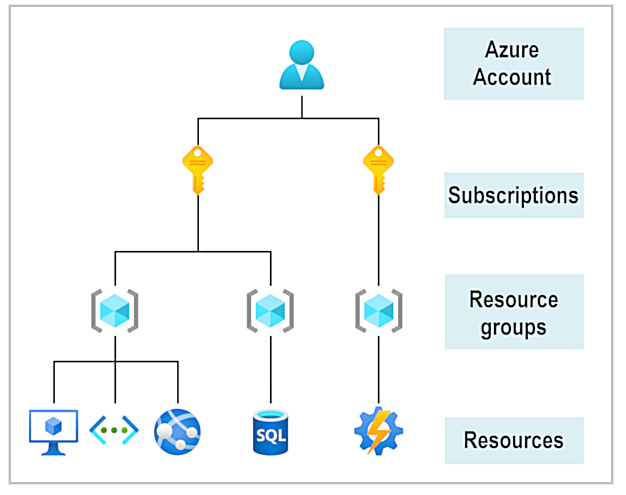
The management infrastructure includes Azure resources, resource groups, subscriptions, and accounts.
Azure Resources
Azure resources are the basic building blocks in Azure. Anything created, provisioned, or deployed in Azure is considered a resource, such as:
- Virtual Machines (VMs)
- App Services
- Networking components
- Databases (SQL Server)
- Azure Functions
Resource Groups
A resource group is a container that holds related resources in Azure. When creating resources, users must assign them to a resource group.
Key Facts About Resource Groups:
- A resource can belong to only one resource group.
- Some resources can be moved to another resource group, but once moved, they are no longer associated with the previous group.
- Resource groups cannot be nested.
Benefits of Resource Groups:
- Bulk Deletion – Deleting a resource group deletes all resources inside it.
- Access Control – Permissions granted to a resource group apply to all its resources.
- Project Structuring – For example, grouping all project-related resources together for easier deletion after project completion.
Azure Subscriptions
Azure subscriptions are used for managing, billing, and scaling resources. Like resource groups, subscriptions help organize both resources and resource groups.
To use Azure, a user must have an Azure subscription, which provides authenticated and authorized access to Azure products and services.
Types of Subscription Limits:
- Billing Limitations – Determines how an Azure account is billed. Having multiple subscriptions allows for separate billing reports.
- Access Control Boundaries – Access management policies can be applied at the subscription level, helping manage access based on organizational structure.
- Environment Separation – E.g., one subscription for production, another for development.
- Organizational Structure – Each department can have its own subscription with specific policies.
- Cost Management – Grouping resources by project or department improves cost tracking.
Azure Management Groups
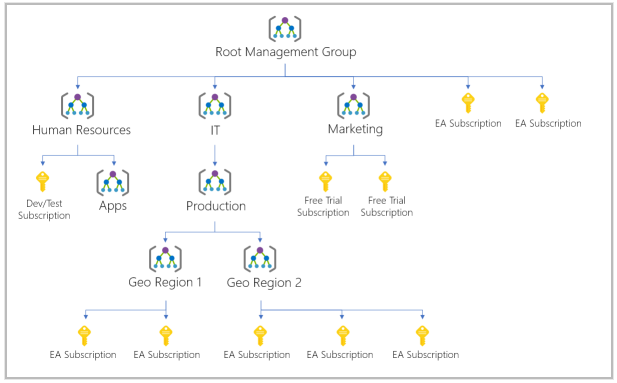
If a user has many subscriptions, a more efficient way is needed to manage access, policies, and compliance across them. Azure Management Groups form a hierarchy above subscriptions, allowing broad policy and access control.
- All subscriptions in a management group automatically inherit its policies and access rules.
- Management groups can be nested, allowing grouping by teams, departments, or other specific needs.
Examples of Using Management Groups:
-
Policy Enforcement – E.g., restrict VM deployment to specific regions within a group named “Production.”
All subscriptions underneath will inherit this policy automatically. -
Access Across Subscriptions – Grouping multiple subscriptions under one management group allows you
to apply access rules once, without repeating them for each subscription.
- Supports up to 10,000 management groups per directory.
- Management group hierarchy can be up to 6 levels deep.
- Each management group and subscription can have only one parent.
- Resources are the basic unit in Azure, organized into resource groups for easier management.
- Azure subscriptions help structure resources and resource groups for cost and budgeting purposes.
- Management groups provide centralized control over subscriptions for unified policy and access enforcement.