Configure Storage Account
Azure Storage is a service used to store files, messages, tables, and other types of information. Azure Storage can be used for applications such as file sharing. Developers use Azure Storage for their working data, such as websites, mobile apps, and desktop apps.
Azure Storage is also used by IaaS virtual machines and PaaS cloud services.
Implementing Azure Storage
Things to Know About Azure Storage: Azure Storage supports three main categories of data:
| Category | Description | Storage Examples |
|---|---|---|
| Virtual machine data | Data for virtual machines includes disks and files. A disk is a persistent block storage for Azure IaaS VMs. A file is a fully managed file share in the cloud. | Virtual machine data storage is provided through Azure Managed Disks. Disks are used by VMs to store data such as file databases, static website content, or custom application code. Disk capacity depends on VM size, up to 32,767 GB. |
| Unstructured data | Data that does not have a fixed structure or format. This format is called non-relational. | Unstructured data can be stored using Azure Blob Storage and Azure Data Lake Storage. Blob Storage is REST-based object storage that is highly scalable. Data Lake Storage is an implementation of Hadoop Distributed File System (HDFS). |
| Structured data | Data stored in a relational format with a consistent schema, usually in table form with rows, columns, and keys. | Structured data can be stored using Azure Table Storage, Azure Cosmos DB, and Azure SQL Database. Cosmos DB is a fully managed global database service. Azure SQL Database is a fully managed SQL database-as-a-service. |
How to Create a Storage Account
Storage accounts in Azure come in two types:
Standard:
- Backed by hard disk drives (HDD).
- Lowest cost per GB.
- Suitable for large storage or infrequently accessed data.
Premium:
- Backed by solid-state drives (SSD).
- Consistent performance with low latency.
- Ideal for Azure VM disks with I/O-intensive applications like databases.
You cannot switch a storage account from Standard to Premium or vice versa.
You must create a new account with the desired type and move the data if needed.
Considerations When Using Azure Storage
- Durability and Availability:
Azure Storage is highly resilient to failures and highly available. Replication keeps data safe from hardware failures and natural disasters.
- Secure Access:
Azure Storage encrypts all data and allows for detailed access control.
- Scalability:
Designed for large-scale scenarios, supporting the performance and storage needs of modern apps.
- Easy Management:
Microsoft handles maintenance and hardware issues.
- Data Accessibility:
Access data from anywhere via HTTP/HTTPS. SDKs available for .NET, Java, Node.js, Python, PHP, Ruby, Go, and REST API.
Also supports scripting via PowerShell, Azure CLI, and GUI tools like Azure Portal and Azure Storage Explorer.
Azure Storage Service Types
Azure Storage offers four data services accessible through a storage account:
- Azure Blob Storage (containers): Massively scalable object storage for text and binary data.
- Azure Files: Managed file shares for cloud or on-premises.
- Azure Queue Storage: Message storage for app component communication.
- Azure Table Storage: Service to store non-relational structured data (NoSQL).
Azure Blob Storage
Azure Blob Storage is Microsoft’s cloud object storage solution. It is optimized for storing large amounts of unstructured or non-relational data, such as text or binary data.
Blob Storage is ideal for:
- Serving images or documents directly to the browser.
- Storing files for distributed access.
- Streaming video and audio.
- Storing backup, disaster recovery, and archival data.
- Storing data for on-premises or Azure-hosted analytics services.
Blob objects can be accessed from anywhere in the world via HTTP/HTTPS. Access via URL, REST API, PowerShell, Azure CLI, or SDKs in .NET, Java, Node.js, Python, PHP, and Ruby.
You can access data in Azure Blob Storage using the NFS or SFTP protocols.
Azure Files
These file shares can be accessed using SMB or NFS protocols.
Common file share use cases:
- On-prem apps using file shares, easing migration to Azure.
- Config files stored in shares, accessed by multiple VMs.
- Tools used by development teams, centrally stored for consistency.
- Logs, metrics, and crash dumps can be written to file shares.
File share access is controlled using storage account credentials, and users mounting the share have full read/write access.
Azure Queue Storage
Azure Queue Storage stores and retrieves messages. Each message can be up to 64 KB, and a queue can hold millions of messages. Used for asynchronous work queues.
Example scenario:
If a customer uploads an image and you want to create a thumbnail, write a message to the queue post-upload. Then an Azure Function reads the queue and generates the thumbnail. Each process component can scale independently.
Azure Table Storage
Azure Table Storage stores non-relational structured data (NoSQL) in the cloud using a flexible key/attribute model. It's easy to adapt data over time as the app evolves. Table Storage offers fast, cost-effective access, typically cheaper than traditional SQL at similar data volumes.
In addition to Table Storage, there's Azure Cosmos DB Table API, which offers:
- High-throughput tables,
- Global distribution,
- Automatic secondary indexes.
-
Massive-scale storage optimization:
Use Azure Blob Storage for large amounts of unstructured data—ideal for global access, streaming, and backups. -
Highly available storage:
Use Azure Files for file shares accessible by many users—great for on-prem migration and team tool sharing. -
Message storage:
Use Azure Queue Storage for high-volume message queues processed asynchronously. -
Structured data storage:
Use Azure Table Storage for structured NoSQL data. Supports global distribution and high performance via Azure Cosmos DB.
Storage Account Types
| Storage Account Type | Supported Services | Recommended Usage |
|---|---|---|
| Standard general-purpose v2 | Blob Storage (including Data Lake Storage), Queue Storage, Table Storage, and Azure Files | Standard storage account for most scenarios, including blobs, file share, queue, table, and disk (page blob). |
| Premium block blobs | Blob Storage (including Data Lake Storage) | Premium storage account for block blobs and append blobs. Recommended for applications with high transaction rates. Use this type if your app works with small objects or requires consistently low storage latency. This type is designed to scale with your application’s needs. |
| Premium file shares | Azure Files | Premium storage account specifically for file shares. Recommended for large-scale enterprise-grade applications. Use this type if you need Server Message Block (SMB) and NFS protocol support for file sharing. |
| Premium page blobs | Page blobs only | High-performance premium storage account for page blobs only. Suitable for storing index-based or sparse structured data, such as operating systems, VM disks, and databases. |
Replication Types
Azure storage accounts must always replicate data to ensure durability and high availability. Replication copies your data to protect against both planned and unplanned events—from hardware failures and power outages to natural disasters.
You can replicate data within the same datacenter, across zones in a region, or across regions.
There are four replication strategies:
- Locally Redundant Storage (LRS)
- Zone Redundant Storage (ZRS)
- Geo-Redundant Storage (GRS)
- Geo-Zone Redundant Storage (GZRS)
Locally Redundant Storage (LRS)
Local replication within one data center with three copies. LRS is the lowest-cost, lowest-durability option. In a datacenter-level disaster (fire, flood), all copies may be lost or unrecoverable.
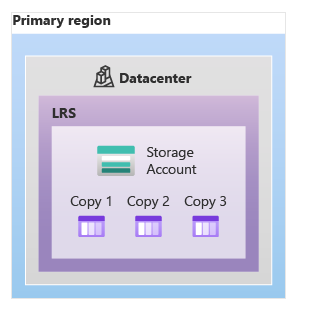
LRS is suitable for:
- Apps storing easily recreated data.
- Constantly changing data where archiving isn’t essential.
- Apps restricted to replicate only within specific countries or regions (regulations).
Zone Redundant Storage (ZRS)
Synchronous replication to three availability zones in a region.
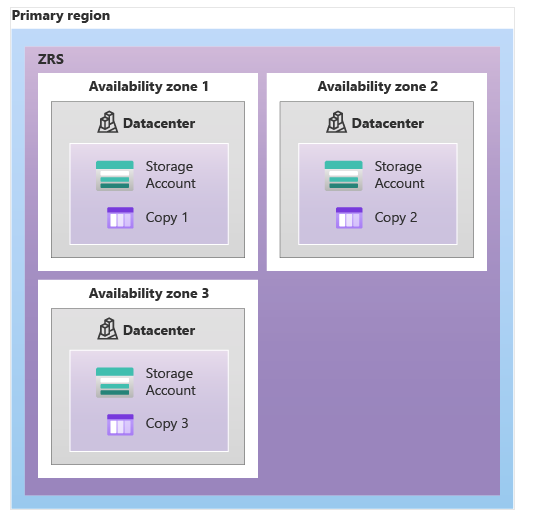
ZRS replicates data across three storage clusters in separate zones. You can still access data if one zone fails. Offers high performance and low latency.
- Not all Azure regions support ZRS.
- Switching to ZRS from another type requires physical data migration.
Geo-Redundant Storage (GRS)
Replication to a secondary region far from the primary.
GRS replicates data to a secondary region (hundreds of miles away), providing high durability during regional outages. It offers 16 nines (99.99999999999999%) durability.
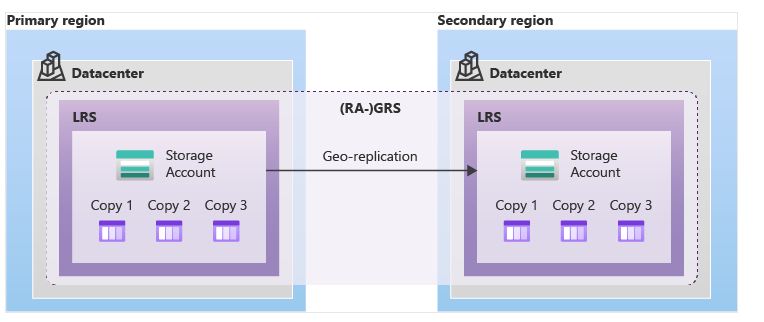
GRS has two options:
- GRS: Read-only from secondary if Microsoft initiates failover.
- RA-GRS (Read-Access GRS): Read access to the secondary region anytime.
How it works:
- Data is first replicated locally (LRS) in the primary region.
- Then asynchronously to the secondary.
- In the secondary, it's also replicated using LRS.
Geo-Zone Redundant Storage (GZRS)
Combines ZRS and GRS for maximum durability.

GZRS replicates data to three zones in the primary region and to a secondary region.
- You can still read/write if one zone fails.
- Data is safe even in full regional disasters.
- Supports scalability like LRS, ZRS, GRS, and RA-GRS.
- You can enable RA-GZRS for read access to the secondary.
- Microsoft recommends GZRS for apps requiring consistency, high durability, high availability, superior performance, and disaster resilience.
- Enable RA-GZRS for read access during regional outages.
Replication Strategy Comparison
| Condition | LRS | ZRS | GRS | RA-GRS | GZRS | RA-GZRS |
|---|---|---|---|---|---|---|
| Node in data center unavailable | ✅ | ✅ | ✅ | ✅ | ✅ | ✅ |
| Entire data center unavailable | ❌ | ✅ | ✅ | ✅ | ✅ | ✅ |
| Entire region outage | ❌ | ❌ | ❌ | ✅ | ✅ | ✅ |
| Read access during regional outage | ❌ | ❌ | ❌ | ✅ | ❌ | ✅ |
Storage Access
Each object in Azure Storage has a unique URL. The storage account name is part of the URL subdomain.
This combination forms the endpoint for the storage account.
| Service | Default Endpoint |
|---|---|
| Container Service | //mystorageaccount.blob.core.windows.net |
| Table Service | //mystorageaccount.table.core.windows.net |
| Queue Service | //mystorageaccount.queue.core.windows.net |
| File Service | //mystorageaccount.file.core.windows.net |
To access an object, append the object’s path to the endpoint.
Example:
To access myblob in mycontainer on mystorageaccount:
https://mystorageaccount.blob.core.windows.net/mycontainer/myblob
Configuring a Custom Domain
You can configure a custom domain to access blobs.
Default endpoint: (account-name).blob.core.windows.net
To map a custom domain/subdomain like www.contoso.com:
Two methods:
-
Direct Mapping:
Enable a custom domain on a subdomain with a CNAME pointing to your storage account.- Subdomain: blobs.contoso.com
- Storage Account: (storageaccount).blob.core.windows.net
- CNAME: contosoblobs.blob.core.windows.net
-
Intermediary Mapping:
Used when a domain is already in Azure. May cause slight downtime.
Avoid downtime by using a verified intermediary domain (asverify). Add a CNAME to verify without direct DNS changes.
Example mapping:
- CNAME: asverify.blobs.contoso.com
- Intermediary: asverify.contosoblobs.blob.core.windows.net
Securing Storage Endpoints
In the Azure portal, every service needs configuration for endpoint and network access.
Use the Firewalls and virtual networks settings. You can add virtual networks or public IPs allowed to access the storage account.
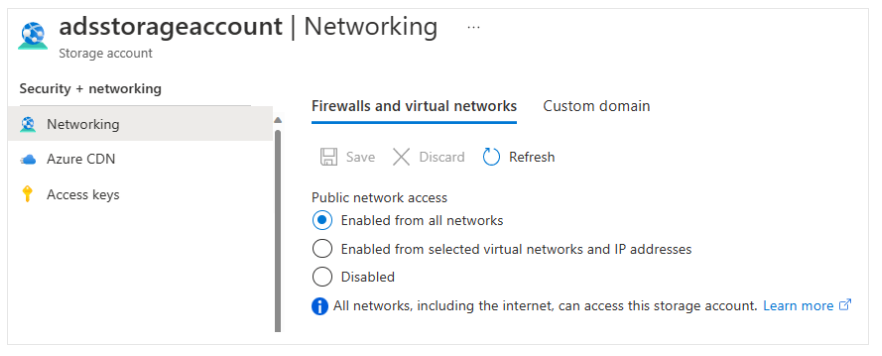
Storage account service endpoints provide the base URL for blob, queue, table, or file access.
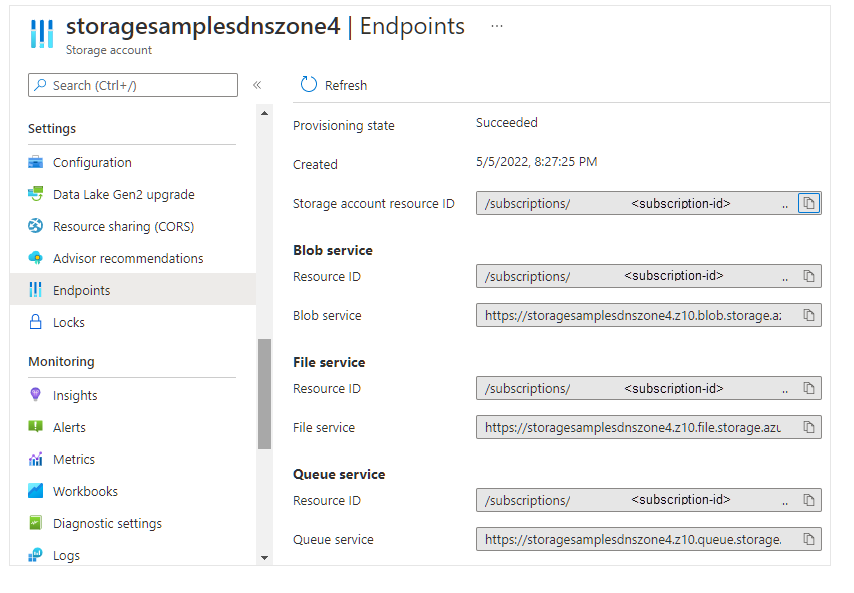
Endpoint Configuration Considerations
- You can allow access from specific public IP ranges.
- Subnets and VNets must be in the same or paired region as the storage account.
Be sure to test service endpoints and verify access is restricted as expected.