Azure VM Availability Configuration
Creating Availability Sets
An availability set is a logical feature used to ensure that a group of related virtual machines are placed together to prevent a single point of failure from affecting all machines.
Key Points About Availability Sets
- All virtual machines within an availability set should ideally perform the same function and have the same software.
- Azure ensures that virtual machines in an availability set run on different physical servers, compute racks, storage units, and network switches.
- Users can create virtual machines and availability sets at the same time.
- Virtual machines can only be added to an availability set at creation. To move a VM to another availability set, users must delete and recreate the VM.
- Microsoft provides a strong Service Level Agreement (SLA) for Azure VMs and availability sets.
Considerations When Using Availability Sets
Here are some planning principles to keep in mind:
- Redundancy: Place multiple virtual machines in an availability set to achieve a redundant configuration.
- Application Tier Separation: Each application tier (e.g., web, app, database) should be in a separate availability set to avoid a single point of failure.
- Load Balancing: For high availability and network performance, create an availability set balanced using Azure Load Balancer. The Load Balancer will distribute incoming traffic to active service instances.
- Managed Disks: Use Azure managed disks together with virtual machines in an availability set for reliable block-level storage.
Review of Update Domains and Fault Domains
Availability Sets in Azure Virtual Machines use two key concepts to ensure high availability and fault tolerance when deploying and updating applications: update domains and fault domains.
Each virtual machine in an availability set will be placed in one update domain and one fault domain.
Key Points About Update Domains
An update domain is a group of nodes updated together during service upgrades or rollouts. Update domains allow Azure to perform updates gradually.
Characteristics of update domains:
- Each update domain contains a set of virtual machines and physical hardware that can be updated and rebooted simultaneously.
- During planned maintenance, only one update domain is rebooted at a time.
- By default, there are five update domains (not user-configurable).
- Users can configure up to 20 update domains if needed.
Key Points About Fault Domains
A fault domain is a group of nodes representing a single unit of potential failure. Fault domains typically reflect nodes within a single physical server rack.
Characteristics of fault domains:
- Fault domains define groups of virtual machines that share a set of hardware or network switches with the same failure point.
- Example: a single server rack with a specific set of power supplies or network switches.
- Two or more fault domains are used together to reduce the risk of hardware failure, network disruptions, power outages, or software updates.
Scenario Example
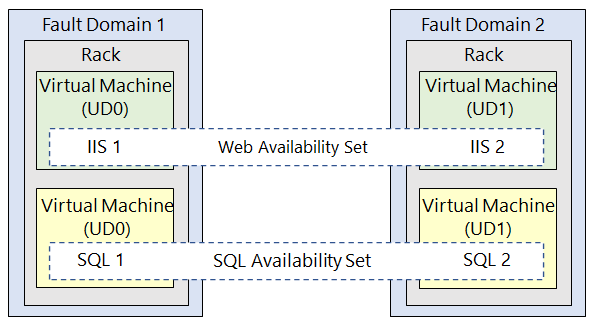
Imagine a user has two fault domains, each containing two virtual machines. These virtual machines are distributed across two different availability sets:
- Availability Set Web: contains two virtual machines, each in a different fault domain.
- Availability Set SQL: also contains two virtual machines, each in a different fault domain.
With this setup, if one fault domain fails, most services remain available because the other virtual machines reside in a different fault domain.
Review of Availability Zone
An availability zone is a high-availability feature that protects your applications and data from datacenter failures. Within a single Azure region, an availability zone is a combination of fault domain and update domain.
If a user creates three or more virtual machines in three zones within a single Azure region, those virtual machines will be effectively distributed across three fault domains and three update domains. Azure recognizes this distribution and ensures that updates are not performed simultaneously across VMs in different zones.
Users can build high-availability application architectures using availability zones by colocating compute, storage, networking, and data resources in one zone and replicating them to others.
Key Points About Availability Zones
- An availability zone is a unique physical location within a single Azure region.
- Each zone consists of one or more datacenters with independent power, cooling, and networking.
- To ensure resilience, each region that supports availability zones has a minimum of three physically separate zones.
- The physical separation between zones within a region protects applications and data from datacenter failures.
- Zone-redundant services replicate your applications and data across multiple zones to avoid a single point of failure.
Considerations When Using Availability Zones
Azure services that support availability zones fall into two categories:
| Category | Description | Example Services |
|---|---|---|
| Zonal services | Each resource is placed in a specific zone. | - Azure Virtual Machines - Azure Managed Disks - Standard IP Addresses |
| Zone-redundant services | Azure platform automatically replicates services across zones. | - Azure Storage with zone redundancy - Azure SQL Database |
For comprehensive business continuity in Azure, build your application architecture using a combination of availability zones and Azure regional pairs.
Comparison of Vertical and Horizontal Scaling
A robust virtual machine configuration includes support for scalability. Scalability allows virtual machines to handle increased workloads as more hardware resources become available. Two primary approaches to scalability are vertical scaling and horizontal scaling.
Vertical Scaling
Vertical scaling (also known as scale up and scale down) is the process of increasing or decreasing the size of a virtual machine based on workload needs.

Example Use Cases for Vertical Scaling:
- If you have a service running on a virtual machine with low usage on weekends, you can scale down the VM size to save costs.
- When demand spikes, you can increase the VM size without creating additional virtual machines.
With vertical scaling, a single virtual machine becomes more powerful (scale up) or lighter (scale down) to match the workload.
Horizontal Scaling
Horizontal scaling (also known as scale out and scale in) involves adding or removing virtual machine instances to handle changing workloads.

Example Use Cases for Horizontal Scaling:
- Add more VMs during high traffic periods (scale out).
- Reduce the number of VMs during low demand periods (scale in).
Horizontal scaling allows systems to grow or shrink by increasing or decreasing the number of virtual machines.
Considerations When Using Vertical and Horizontal Scaling
| Consideration | Vertical Scaling | Horizontal Scaling |
|---|---|---|
| Limitations | Limited by maximum hardware size; may require a VM restart. | Generally more flexible; can use many VMs at once. |
| Flexibility | Less flexible in cloud; may be slower. | More flexible; can handle thousands of VMs. |
| Reprovisioning | May be needed when changing VM size; can cause downtime. | Requires planning for VM replacement and data migration. |
Note
A strong availability plan should consider when reprovisioning is needed and how to retain and migrate data during machine replacements.
Implementing VM Scale Sets
Azure Virtual Machine Scale Sets are Azure compute resources that allow users to deploy and manage a set of identical virtual machines.
Scale Sets automatically increase the number of VM instances as demand rises, and reduce them as demand falls, without manual pre-configuration of each VM.
Benefits of Using Virtual Machine Scale Sets
- Improved application availability and scalability.
- Automatic scaling based on demand.
- No need for pre-provisioning; ideal for large-scale apps like big data, containers, and high-performance workloads.
- Instances can be added or removed manually, automatically, or in combination.
Key Characteristics of Virtual Machine Scale Sets
- All VM instances are created from the same OS image and configuration, making it easier to manage hundreds of VMs without extra setup.
- Supports Azure Load Balancer for layer-4 traffic distribution and Azure Application Gateway for layer-7 and TLS/SSL termination.
- Can run multiple app instances simultaneously — if one VM fails, users can still access the app through other instances with minimal disruption.
- Supports autoscaling for applications with variable demand throughout the day/week.
- Supports up to 1,000 VM instances with Azure-provided images, and up to 600 instances with custom VM images.
Note
Azure Virtual Machine Scale Sets are ideal for high availability, cost efficiency, and dynamic scaling based on workload.
Creating VM Scale Sets
Users can deploy Azure Virtual Machine Scale Sets via the Azure portal. During creation, users specify the number of VMs, VM size, and preferences like using Azure Spot Instances, managed disks, and allocation policies.
Key Settings When Creating Scale Sets
When creating Virtual Machine Scale Sets in the Azure portal, users configure the following:
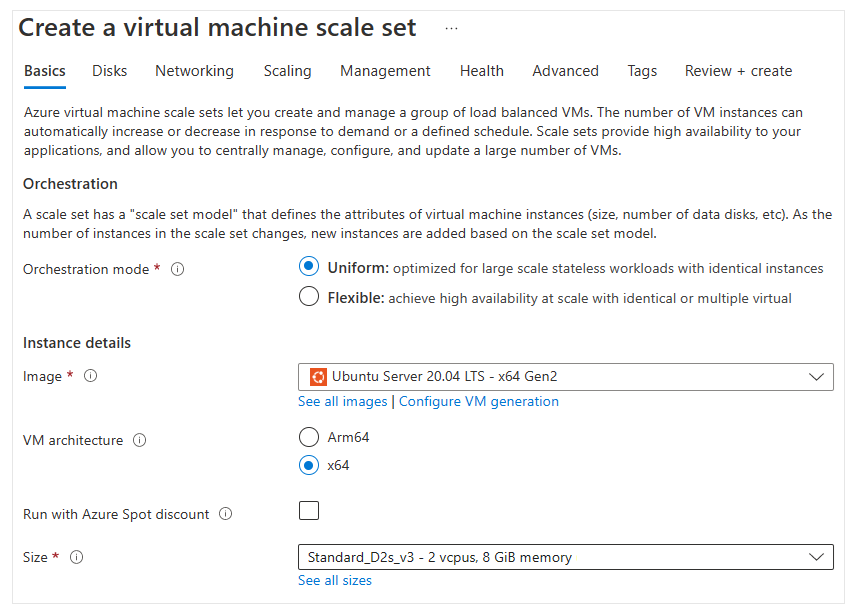
Orchestration Mode
- Flexible: Users can manually add VMs with different configurations to the scale set.
- Uniform: Users define a single VM model, and Azure creates identical instances from that model.
Operating System (Image)
- Choose the base operating system or application to be used by the VMs.
VM Architecture
- x64: Broadest software compatibility.
- Arm64: Offers up to 50% better price/performance efficiency than equivalent x64.
VM Size
- Choose the appropriate VM size based on workload. Size impacts compute power, memory, and storage capacity.
- Azure offers various sizes and charges per hour based on VM size and OS.
Advanced Settings
Spreading Algorithm
- Max spreading (recommended): VMs are spread as much as possible across fault domains in a zone.
- Fixed spreading: VMs are always spread across five fault domains. If fewer than five are available, the scale set fails to deploy.
Recommendation
Use Max spreading to increase fault tolerance and deployment success.
...
Autoscale Implementation
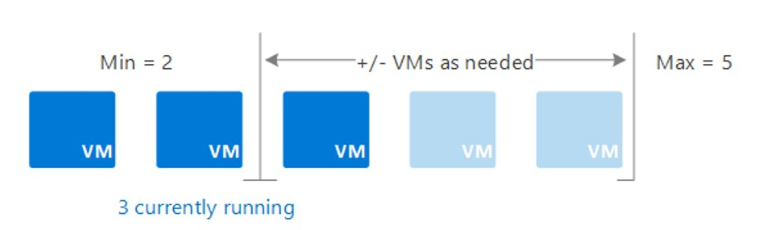
In the implementation of Azure Virtual Machine Scale Sets, users can enable an automated process to increase or decrease the number of VM instances based on application demand. This process is called autoscaling, which allows user configurations to dynamically adapt to changing workloads.
Autoscale helps minimize the number of VM instances running during low demand while ensuring good application performance by automatically adding VM instances during high demand.
Illustration
For example, users can configure autoscale with a minimum of 2 VMs and a maximum of 5 VMs, depending on application workload.
Things to Consider When Using Autoscaling
1. Automatic Capacity Adjustment
Users can create autoscale rules based on performance metrics such as CPU usage or memory usage. When a certain threshold is reached, the autoscale rule will automatically adjust the user's VM Scale Set capacity.
2. Scale Out (Adding Instances)
If application demand consistently increases, users can configure rules to increase the number of VMs in the Scale Set to properly handle the workload.
3. Scale In (Reducing Instances)
When demand decreases, such as at night or on weekends, autoscale rules can reduce the number of VMs to save costs — users only run the necessary instances to meet current demand.
4. Scheduling (Scheduled Events)
Users can also schedule specific times to increase or decrease capacity automatically, for example during working hours or online promotions.
5. Reduced Administrative Burden
With autoscaling, users don't need to constantly monitor and manually adjust application performance. This reduces management overhead and ensures the application stays optimal without direct intervention.
Note
Autoscaling is a key feature to maintain cost efficiency, system agility, and a consistent user experience.
Autoscale Configuration
When users implement Azure Virtual Machine Scale Sets via the Azure portal, they can enable either manual or automatic scaling (autoscaling). For optimal performance, users should set the minimum, maximum, and default number of virtual machine (VM) instances to be used.
Scale Mode
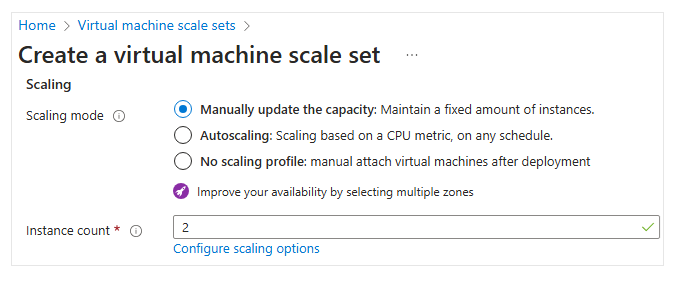
In the Azure portal, users can choose the desired scale mode.
-
Manually update capacity: Users can manually update capacity and keep the number of instances fixed. Set the number of instances as needed (between 0–1000).
Users can also configure scale-in policies, which determine the order of VMs selected for deletion. For example, users can spread the load evenly across zones and remove VMs with the highest Instance ID. -
Autoscaling: Users can enable autoscaling based on schedules or metrics. Define the maximum number of VM instances that can be available when autoscaling is active in the implementation.
Autoscale Configuration
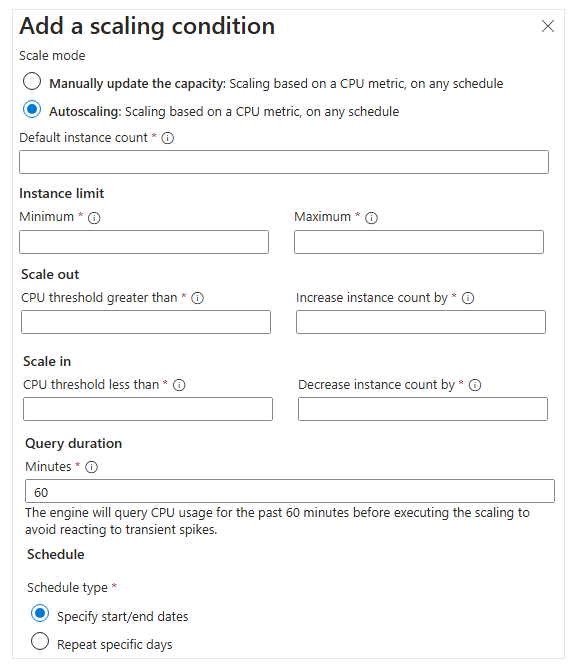
Autoscaling is configured based on specific scaling conditions.
-
Default instance count: The initial number of VMs deployed in the scale set (between 0–1000).
-
Instance limits:
- Minimum: The minimum number of instances during scale-in.
- Maximum: The maximum number of instances during scale-out.
-
Scale Out (Scale Up):
- The CPU usage threshold percentage to trigger a scale-out rule.
- The number of new instances to be added when the rule is met.
-
Scale In (Scale Down):
- The CPU usage threshold percentage to trigger a scale-in rule.
- The number of instances to be reduced when the rule is met.
-
Query Duration:
This is the average metric review period by the Autoscale engine. This duration allows the user's metric data to stabilize before rules are applied. -
Scheduling (Schedule):
Users can set start and end dates for autoscaling. The schedule can also be repeated on specific days according to business needs.
Use autoscaling to enhance cost efficiency and system performance by dynamically adjusting VM capacity to match workloads.
Maintenance and Downtime Planning
An availability plan for Azure virtual machines needs to include strategies for unplanned hardware maintenance, unexpected downtime, and planned maintenance.
Unplanned Hardware Maintenance
Unplanned hardware maintenance events occur when the Azure platform predicts that hardware or platform components associated with a physical machine are about to fail. When failure is predicted, Azure initiates an unplanned hardware maintenance event using Live Migration technology to migrate virtual machines from failing hardware to healthy physical hardware.
Live Migration is an operation that preserves the virtual machine by only briefly pausing it.
However, performance may degrade before or after the event.
Unexpected Downtime
Unexpected downtime occurs when the physical hardware or infrastructure for a virtual machine suddenly fails.
Unexpected downtime may include local network failures, disk failures, or failures at the rack level.
When detected, the Azure platform automatically migrates (heals) the user's virtual machine to healthy physical hardware in the same data center.
During this healing process, the virtual machine will experience downtime (reboot), and in some cases, may lose temporary drives.
Planned Maintenance
Planned maintenance events are periodic updates performed by Microsoft on the Azure base platform to improve the reliability, performance, and security of the platform infrastructure on which virtual machines run.
Microsoft does not automatically update the operating system or other software on virtual machines.
Users have full control and responsibility for those updates. However, host software and underlying hardware are periodically
updated to ensure high reliability and performance.