Azure Container Instance Configuration
Comparing Containers with Virtual Machines
Hardware virtualization allows running multiple isolated instances of operating systems simultaneously on the same physical hardware.
Containers are the next stage in computing resource virtualization.
Container-based virtualization enables operating system virtualization. This approach allows users to run multiple applications within a single OS instance,
while still maintaining isolation between applications. Containers inside virtual machines provide similar functionality as virtual machines inside physical servers.
Things to Know About Containers vs Virtual Machines
To better understand container-based virtualization, let's compare containers and virtual machines.
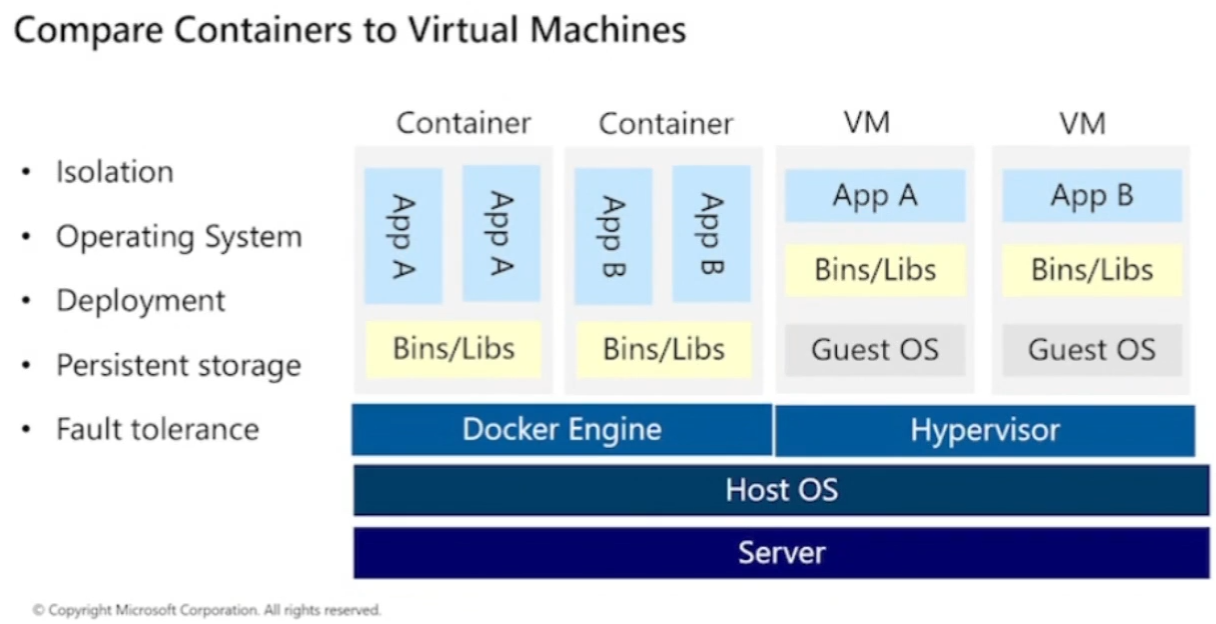
| Comparison | Container | Virtual Machine |
|---|---|---|
| Isolation | Provides lightweight isolation from the host and other containers, but not as strong as VMs' security boundaries. | Provides full isolation from the host OS and other VMs. Suitable when strong security boundaries are required, such as running apps from different companies on the same server or cluster. |
| Operating System | Runs user mode parts of the OS and only loads services required by the application. More resource-efficient. | Runs a full OS including the kernel, requiring more CPU, memory, and storage resources. |
| Deployment | Can be run using Docker CLI. For many containers, use orchestrators like Azure Kubernetes Service. | Can be run using Windows Admin Center or Hyper-V Manager. For many VMs, use PowerShell or System Center Virtual Machine Manager. |
| Persistent Storage | Use Azure Disks for local node storage, or Azure Files (SMB share) for shared storage across nodes/servers. | Use virtual hard disk (VHD) for local VM storage, or SMB file shares for shared storage between servers. |
| Fault Tolerance | If a cluster node fails, the orchestrator on another node immediately recreates containers that were running there. | VMs can failover to another server in the cluster, with their OS restarting on the new server. |
Considerations When Using Containers
Containers offer several advantages over physical or virtual machines. Consider the following benefits and how you can apply containers for internal enterprise applications:
-
Flexibility and Speed
Gain greater flexibility and faster development and distribution of containerized application code. -
Testing
Use containers to simplify application testing processes. -
Application Deployment
Use containers to accelerate and streamline application deployment. -
Workload Density
Support higher workload density and improve resource utilization by using containers.
Azure Container Instances Overview
Containers are now the preferred method for packaging, deploying, and managing cloud applications. In Azure, there are many options to build and run cloud-native and container-based applications. One of the simplest and fastest options is Azure Container Instances (ACI).
What is Azure Container Instances?
Azure Container Instances provide the fastest and easiest way to run containers in Azure without managing virtual machines or using more complex services. ACI is ideal for scenarios that can run in isolated containers.
Understanding Container Images
All containers are created from container images, which are lightweight, standalone, executable software packages that include everything needed to run an application, including:
- Code: The application's source code.
- Runtime: The environment required to run the application.
- System tools: Essential utilities needed by the application.
- System libraries: Shared libraries used by the application.
- Settings: Application-specific configuration parameters.
Once created, a container image becomes a portable unit that runs consistently across different computing environments.
Benefits of Azure Container Instances
Here are the main benefits of using Azure Container Instances for your internal applications:
-
Fast startup time
Containers can run in seconds without needing to deploy or manage VMs. -
Public IP and DNS connectivity
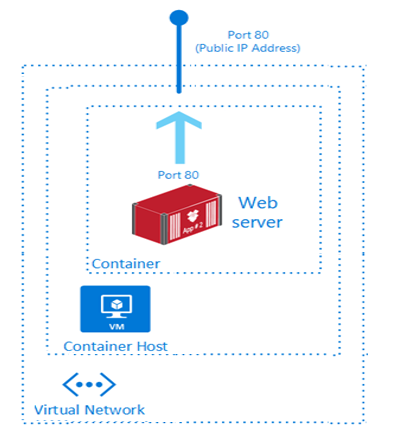
Containers can be exposed directly to the internet using IP addresses and FQDN (Fully Qualified Domain Name). -
Adjustable size
Container resources can be dynamically scaled according to application needs. -
Persistent storage
ACI supports direct mounts to Azure Files for persistent data storage. -
Support for Linux and Windows
ACI can run Linux-based and Windows-based containers. Specify the OS type when creating a container group. -
Coscheduled groups
Supports scheduling multi-container groups sharing the same host machine resources. -
Deployment to Virtual Network
Containers can run inside an Azure virtual network, allowing better network control and security.
Implementing Container Groups
A Container Group is a top-level resource in Azure Container Instances (ACI). It is a collection of containers scheduled to run on the same host machine. Containers in one group share:
- Lifecycle
- Resources (CPU, memory, GPU)
- Local network
- Storage volumes
Things to Know About Container Groups
- Container groups are similar to pods in Kubernetes.
- Containers in one group can share related resources.
- Azure sums the resource requirements of all containers in a group to allocate resources.
- Two common ways to deploy multi-container groups:
- ARM Template: Suitable if you want to include other Azure resources (e.g., Azure Files).
- YAML File: More concise and suitable for container-only deployments.
Connectivity and IP
- Container groups can share a public IP address and ports, as well as DNS labels with FQDN.
- To allow external access, ports must be exposed on both IP and containers.
- Port mapping is not supported since all containers share the same port namespace.
- When the container group is deleted, its IP and FQDN are also released.
Container Group Configuration Example
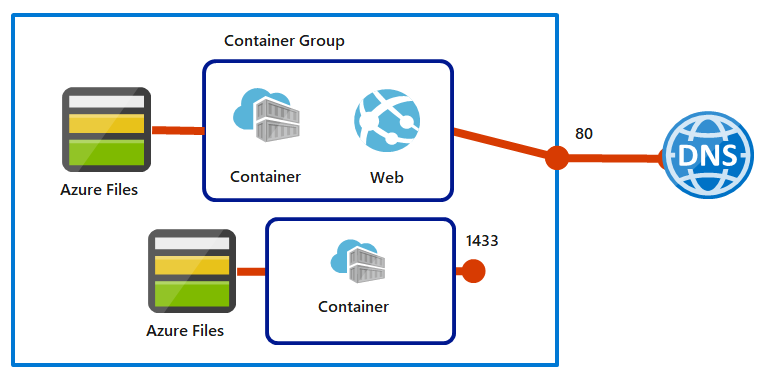
A multi-container group scenario with 2 containers:
- Runs on one host machine.
- Has one DNS label and one public IP address.
- Container 1 listens on port 80 (web app).
- Container 2 listens on port 1433 (database).
- Each container mounts an Azure Files share for persistent storage.
Considerations When Using Container Groups
Container groups are useful when you want to split one app function into multiple containers. For example:
1. Web App Updates
- One container serves the web app.
- A second container pulls the latest content from source control.
2. Log Collection
- The app writes logs to standard output.
- A logging container reads the output and stores it in long-term storage.
3. App Monitoring
- A monitoring container accesses the app container regularly.
- If issues arise, the monitoring container sends alerts.
4. Front-end and Back-end Support
- Front-end container serves the web UI.
- Back-end container provides data services or APIs.
Using container groups in ACI lets you manage related containers as one efficient, flexible, and scalable deployment unit.
Ideal for modern microservices architectures and fast dev/test cloud needs.
Azure Container Apps Overview
Azure Container Apps (ACA) is a serverless platform to run container applications without managing server infrastructure, container orchestration, or complex deployment processes.
With ACA, you focus on building and running cloud-native apps without direct Kubernetes configuration.
Common Uses of Azure Container Apps
- Providing API endpoints
- Running background jobs
- Handling event-driven processing
- Running microservices architectures
Scalability Features
Azure Container Apps can autoscale based on:
- HTTP traffic
- Event-driven processing
- CPU or memory load
- Scalers supported by KEDA (Kubernetes-based Event Driven Autoscaler)
ACA Key Features
- Built on Kubernetes but without managing Kubernetes directly.
- Uses open-source tech such as:
- Dapr (for microservices)
- KEDA (for event-driven autoscaling)
- Envoy (for proxy and service mesh)
- Supports event-driven and microservices architectures.
- Supports various job types:
- On-demand jobs
- Scheduled jobs
- Event-driven jobs
- Supports scale to zero when idle.
- No direct Kubernetes API access — good for teams wanting Kubernetes benefits without complexity.
Comparison: Azure Container Apps vs Azure Kubernetes Service
| Feature | Azure Container Apps (ACA) | Azure Kubernetes Service (AKS) |
|---|---|---|
| Overview | Serverless platform for microservices, hiding infrastructure details. | Managed Kubernetes service providing full cluster control. |
| Deployment | Fast, easy PaaS experience. | Full control and high customization for complex apps. |
| Management | Simpler, built on top of AKS. | Provides detailed control for teams with Kubernetes expertise. |
| Scalability | Autoscaling based on HTTP and events. | Supports Horizontal Pod Autoscaler and Cluster Autoscaler. |
| Use Case | Microservices and serverless apps needing fast scaling and easy management. | Complex long-running apps needing full Kubernetes features. |
| Integration | Integrated with Logic Apps, Event Grid, and Azure Functions. | Full integration with Azure Policy, Azure Monitor, and Azure Defender for Kubernetes. |
When to Use Azure Container Apps?
Use ACA if you:
- Want to build microservices without Kubernetes complexity.
- Need apps that autoscale based on events.
- Focus on time-to-market and want to reduce operational burden.
- Want to integrate ACA with other Azure services like Event Grid or Logic Apps.
Azure Container Apps simplify modern container and microservices deployment in the cloud.
Ideal for teams wanting Kubernetes benefits without its complexity.
ACA provides an easy way to run container apps that are efficient, scalable, and event-driven, perfect for today’s cloud solutions.